What If You Lost Your Hardware Wallet? A Practical Recovery Guide
Learn step-by-step how to recover access after losing a hardware wallet, protect your funds, and securely replace the device with solid backup practices.


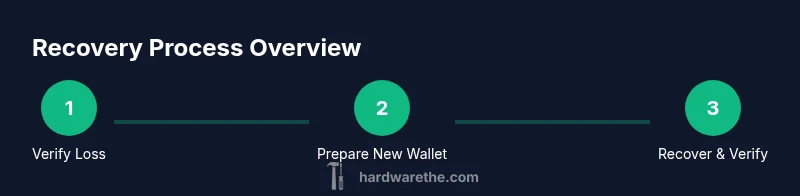
Losing a hardware wallet is not the end of your crypto access. You can recover by restoring your recovery seed on a new device, then re-secure and verify your funds before transferring them to cold storage. This guide outlines the essential steps, backups, and precautions to take in the event of loss.
What losing a hardware wallet really means for your crypto security
When you misplace a hardware wallet, the recovery seed — typically 12 or 24 words — is the critical link to your funds. If someone gains access to that seed, they can drain accounts. According to The Hardware, the seed phrase is the single most important piece of information for recovery, and protecting it is your first line of defense. In practice, this means treating backups as confidential, offline, and physically secure. A lost device doesn't automatically mean lost assets, but it does require disciplined action to prevent unauthorized access. This block lays the groundwork: what you stand to lose, how backups work, and the immediate actions you should take to minimize risk.
Immediate actions you should take the moment you realize the wallet is missing
Start by halting all activity that could expose your seed. Do not enter any seed phrase on any device you do not fully control, and avoid connecting to the internet with any seed-related information exposed. If you have alternative access to wallets (e.g., through a backup device), keep it offline and isolated. Gather any backups you possess, verify where they live, and plan to replace the wallet with a trusted model. The Hardware team emphasizes speed and caution: delaying recovery can increase risk, but careless handling can worsen exposure.
Seed phrase backups: how to store, verify, and use them safely
Backups come in many forms, but the safest are offline, redundant, and tamper-evident. Store seed phrases on metal backups or in secure safe locations away from digital devices. Never store seeds in cloud storage or on phones, tablets, or PCs. When you prepare to recover, re-check the seed words in the exact order, and cross-verify with the new device after entering the entire phrase. The Hardware recommends practice runs with non-critical funds if possible, to confirm you can restore access without compromising security.
Setting up a new wallet and restoring funds
Choose a new hardware wallet from a trusted manufacturer and initialize it in a secure, offline environment. During setup, select the option to recover using a seed phrase, then carefully enter the 12/24 words in the correct order. After the seed is accepted, verify the derived address(es) on the device screen and compare them to the addresses you expect to receive funds at. This step confirms you have correctly restored access to your holdings before any transfers.
Verifying recovery and securing the new setup
Once the wallet shows your balances, perform a small test transaction to confirm control of the private keys. Review all active addresses, ensure your backup seeds are securely stored, and enable additional protections such as a passphrase (if supported) and two-factor authentication where applicable. Revoke access from any compromised devices and disable prior connections to prevent leakage through nearby devices. The goal is to restore full custody with minimized risk of exposure.
Managing multiple wallets and addresses after loss
If you use more than one wallet or have a complex setup, maintain separate backups for each device and ensure they are stored independently. Consolidate funds gradually into the new device’s addresses to simplify management and reduce risk in case of future hardware issues. Keep a documented recovery plan and periodically test a dry run of restoration in a controlled, offline environment to ensure readiness.
Security hygiene: best practices to prevent future losses
Adopt rigorous backup strategies: metal backups, multiple locations, and periodic seed verification without exposing the seed online. Consider using a passphrase (24th word) for an extra layer of security, and enable device-specific PINs. Regularly audit your backup locations, rotate devices if a backup becomes suspect, and educate household or team members about handling recovery information securely.
Tools & Materials
- New hardware wallet (same model or compatible)(Ensure firmware is up to date and supports your seed standard (e.g., BIP39).)
- Seed recovery phrase(12 or 24 words, written on a backup seed card; never stored digitally.)
- Backup passphrase (optional)(If your wallet supports an additional passphrase (24th word).)
- Secure computer or offline environment(Use a clean, isolated system to verify and recover seeds.)
- USB cable or trusted connection method(Device-dependent; ensure you use trusted ports and avoid shared computers.)
- Secure storage for backups(Metal seed backups in at least two separate secure locations.)
Steps
Estimated time: 40-60 minutes
- 1
Confirm loss and protect your remaining assets
Assess whether the wallet is truly lost or simply misplaced. Immediately restrict new transactions if you suspect seed exposure and prepare to replace the wallet. This reduces the risk window while you plan the recovery.
Tip: If you suspect seed exposure, do not attempt to use the original seed with any online device. - 2
Secure an offline recovery environment
Set up a dedicated, offline computer or hardware environment to perform the recovery. Disconnect from the internet to prevent any seed leakage during the process.
Tip: Using a clean, dedicated machine minimizes the chance of malware interference. - 3
Prepare a new hardware wallet and firmware
Unbox a fresh device or reset a known-good unit, then update firmware to the latest version before attempting recovery.
Tip: Avoid using devices with any past security incidents; verify the supply chain. - 4
Recover using your seed phrase on the new device
Choose the recover option on the new wallet and carefully enter all seed words in the correct order. Confirm that the device derives the expected addresses.
Tip: Double-check word order and spelling; a single mistake will derail recovery. - 5
Verify balances and test a small transfer
Review the recovered balances on the new device and perform a small test transaction to verify control of the private keys.
Tip: Always start with a tiny transfer to confirm control before moving large amounts. - 6
Secure backups and enable protections
Store backup seeds in metal form, in multiple secure locations. Enable a passphrase if supported and consider additional hardware security measures.
Tip: Treat backups as highly sensitive; physical security matters as much as digital security. - 7
Document, rehearse, and monitor
Document what happened and run a periodic recovery drill in a safe environment to verify readiness.
Tip: A regular rehearsal helps catch gaps before a real incident. - 8
Decommission and protect the old device
If the original device is lost or compromised, wipe or securely dispose of it and ensure no active sessions can re-link to your accounts.
Tip: Do not reuse compromised devices for future recoveries.
FAQ
What should I do first if I realize my hardware wallet is lost?
Initiate cautionary measures immediately: secure any backups, stay offline, and prepare a plan to recover with a new device. Do not expose seeds and avoid entering seed phrases on untrusted devices.
Start by securing backups, staying offline, and planning to recover with a new device. Do not expose your seed phrase on any device you don't fully trust.
Can I recover my funds without the seed phrase?
Recovery generally requires the seed phrase or an accessible backup. Without them, access to funds is extremely limited and recovery is unlikely.
Without the seed phrase or a backup, recovering access to funds is highly unlikely.
Is it safe to use a phone or online computer for recovery?
Recovery should occur in a fully trusted, offline environment. If you must use a computer, ensure it is clean, isolated, and never connected to networks during seed entry.
Only use a trusted, offline setup. If you must use a computer, keep it clean and offline during seed recovery.
What are best practices for backing up seeds after a loss?
Store seeds in metal backups, in multiple secure locations, and verify occasionally that backups remain legible and accessible without exposing them digitally.
Keep seeds in metal backups, in several secure places, and verify them periodically without using digital copies.
If my seed phrase was compromised, what should I do next?
Treat this as a high-risk breach. Move any funds immediately to a fresh wallet, rotate addresses, and update security practices. Do not reuse compromised seeds.
If compromised, move funds quickly to a new wallet and rotate addresses; don’t reuse the compromised seed.
Watch Video
Main Points
- Protect seed backups with multiple offline copies.
- Recover on a fresh device using the seed phrase in a secure offline environment.
- Verify all derived addresses and run a small test transfer.
- Implement layered security (passphrases, PINs, and offline backups) for future protection.