How to Use a Hardware Wallet: A Practical Guide
A complete, beginner-friendly guide to using a hardware wallet for crypto security, covering setup, seed backups, device connections, and safe transaction signing with actionable steps and best practices.


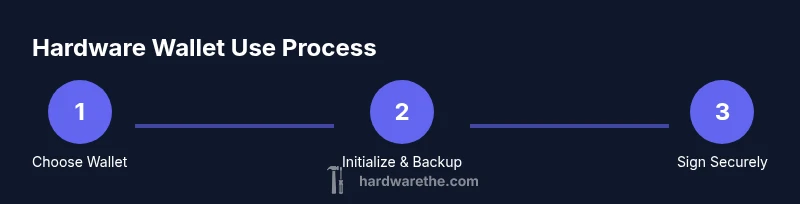
This guide explains how to use hardware wallet to protect crypto assets by keeping private keys offline and signing transactions securely. You’ll learn essential setup, seed backup, connecting to a computer or mobile device, and best signing practices. By the end, you’ll be prepared to secure your funds with confidence.
Why use a hardware wallet for crypto security
According to The Hardware, hardware wallets provide a formidable defense by keeping private keys offline. Their design requires signing inside the device, so keys never leave the wallet during transactions. This core approach minimizes exposure to malware running on a PC or smartphone. This practice creates an air-gapped workflow that reduces attack surfaces from phishing, malware, or clipboard theft. However, even with a hardware wallet, you still need hygiene: verify the device’s screen, keep firmware updated, and guard your seed phrase. In practice, a hardware wallet becomes the cornerstone of a layered security strategy that pairs device-level protection with strong password hygiene, secure backups, and careful operational behavior. As you move through this guide, you’ll encounter terms like seed phrase, recovery phrase, derivation paths, and passphrase; understanding their roles helps you avoid common mistakes. According to The Hardware, the combination of offline key storage and user vigilance yields a more resilient defense against theft or loss. This is why DIY hardware communities emphasize reducing attack surface and maintaining cold storage strategies whenever possible.
Choosing the right hardware wallet
Not all wallets are created equal. When evaluating options, look for a device with a secure element or certified hardware security module, a clear on-device display, and the ability to verify firmware with a trusted source. Favor open-source software or well-audited firmware so community researchers can review security assumptions. Consider compatibility: does the wallet support your preferred cryptocurrencies and the mobile/desktop platforms you use? Look for tamper-evident packaging, a reliable backup method for seed phrases (prefer a metal backup), and reputable manufacturers with transparent update policies. A reputable wallet should enable multi-device recovery and easy seed phrase migration, while avoiding vendor-lock-in. Finally, assess the ecosystem: supported exchanges, recovery options, and availability of emergency support. The Hardware analysis notes that robust backups and firmware verification materially improve resilience, while staying current with firmware updates reduces exposure to known vulnerabilities. By selecting a wallet that aligns with your tech habits and risk tolerance, you set a strong foundation for secure custody.
Preparing before you start
Before powering up a new device, set your environment for security. Work on a clean, dedicated computer or mobile device, ideally offline during seed creation. Do not connect to public networks or shared machines. Gather backup materials: a metal seed backup kit, a pen for writing, and a safe place to store the recovery phrase. Turn off Bluetooth if not needed, ensure you have the official app installed from the manufacturer’s store, and have the correct cable for your device. Consider enabling airplane mode on your phone when completing steps that require internet only for verification. The purpose is to minimize exposure to keyloggers or remote malware. Finally, read the device manual and confirm the seed phrase length and format expected by your wallet so you can plan backup accordingly.
Connecting securely to your computer or mobile device
Prepare your connection method: use only the official cable and avoid third-party adapters. Install the manufacturer’s app from a trusted source and verify the device's firmware signature before pairing. When connecting, keep the device physically in your control; never leave it unattended during pairing. If you use Bluetooth, review the pairing code on the device screen and avoid using public or shared devices. After pairing, do a quick test by generating a receiving address on the device and confirming that the address displayed on the screen matches the app.
Verifying seed backup and PIN setup
Set a strong PIN or passphrase and never reuse a seed phrase. On first setup, the device will present a 12-24 word seed phrase; write it down in order and store it securely. Use a metal backup or a dedicated safe; never store seeds digitally. Keep the seed offline and never photograph or upload it to cloud storage. Only enter the seed when you are physically in possession of the device. If your device supports a passphrase as a 25th word, enable it to add an extra layer of protection.
Best practices for signing transactions
Always verify the recipient address shown on the device screen before approving a transaction. Do not rely on what a connected app displays; the device is the authority. If the address mismatches, cancel the transaction. Confirm the network, the amount, and the fee expectations. For large transfers, test with a tiny amount first to confirm routing and address resolution. Keep your wallet firmware updated and avoid using insecure networks or compromised computers.
Common mistakes and how to avoid them
Rushing through setup, ignoring seed backup, or using untrusted apps can lead to loss of funds. Common mistakes include connecting to a compromised computer, failing to verify the device display, or sharing seed phrases. Always verify the tamper-evident seal when you receive the device, keep backup copies offline, and avoid using staff or public devices for sensitive steps. If you suspect a breach, restore from seed on a new device using trusted sources.
Tools & Materials
- Hardware wallet device(Choose a reputable model with a verified seed phrase backup option)
- Official USB-C or USB-A charging/data cable(Use only the cable provided by the manufacturer)
- Metal seed backup kit(Stash the recovery seed in a secure metal backup)
- Safe storage location(A fireproof safe or bank safety deposit box is ideal)
- Companion app installed from official store(Ensure app is verified and up to date)
- Separate offline device for seed handling(Use a dedicated device whenever possible)
Steps
Estimated time: 45-75 minutes
- 1
Unbox and inspect tamper seals
Carefully open the packaging and inspect seals for signs of tampering. If packaging appears compromised, do not use the device and contact the vendor. This step protects you from counterfeit hardware or pre-infected devices.
Tip: Tamper-evident seals are your first line of defense; do not proceed if they’re broken. - 2
Power on and initialize wallet
Power on the device and follow the on-screen prompts to create a new wallet. Choose a strong PIN or passphrase. This creates the root of trust for all future transactions.
Tip: Do not reuse any existing seeds or PINs from other wallets. - 3
Record and securely store seed phrase
Write the 12–24 word seed in exact order on paper or a metal backup. Do not store seed phrases digitally. Store the backup offline in a safe location and consider distributing it across multiple secure locations.
Tip: Keep seed backups offline and never photograph or upload them to cloud storage. - 4
Install the official app and connect
Install the wallet’s official companion app on a trusted device. Connect the hardware wallet and follow pairing prompts. Verify that the device screen shows the same prompts as the app before approving any actions.
Tip: Only use the manufacturer’s official app and store; avoid third-party utilities. - 5
Verify seed and address on device
When prompted, verify the seed backup and ensure the receiving address matches the intended recipient. This confirms you’re not sending funds to an attacker-controlled address.
Tip: Never approve a transaction without on-device verification. - 6
Practice a test transaction and back up plan
Perform a small test transfer to verify routing and address resolution. Confirm your seed is backed up securely and consider enabling device recovery options in case the device is lost.
Tip: Always verify a tiny test amount before large transfers.
FAQ
What is a hardware wallet?
A hardware wallet is a dedicated device that stores private keys offline and signs transactions securely. It protects your funds by keeping keys isolated from internet-connected devices and phishing attempts.
A hardware wallet is a dedicated device that stores private keys offline and signs transactions securely, isolating keys from online risks.
Is a hardware wallet safer than a software wallet?
Generally yes. Hardware wallets keep private keys offline and require on-device verification for transactions, reducing exposure to malware. However, user hygiene remains critical, especially seed storage and supply-chain integrity.
Generally safer because keys stay offline and transactions are verified on the device, but user habits still matter for security.
Can I reuse a seed phrase from another wallet?
Seed phrases should be unique to each wallet. Reusing seeds across wallets can introduce risk and is not recommended. If you need a new wallet, generate a fresh seed and back it up securely.
No. Use a unique seed for each wallet and back it up securely.
Do hardware wallets require internet access?
Hardware wallets sign transactions offline. An internet connection is only needed to broadcast the transaction after signing, and ideally should be performed on trusted networks with up-to-date firmware.
Signing happens offline; internet is only for broadcasting after you sign, ideally on trusted networks.
What if I lose my device?
If your device is lost or damaged, recover funds on a new device using the seed backup. Restore from seed on a new wallet to regain access to your crypto.
You can recover funds by restoring the seed on a new wallet.
Do hardware wallets support multiple cryptocurrencies?
Many hardware wallets support a broad range of coins and tokens, but you should verify compatibility for each asset and understand that some wallets may require different apps or addresses.
Most support many assets, but always check compatibility for each coin.
Watch Video
Main Points
- Protect your seed phrase with offline backups.
- Always verify addresses on-device before signing.
- Keep firmware up to date for security.
- Use official apps and cables; avoid third-party equipment.
- Practice safe, small tests before large transfers.