What To Do If Your Crypto Hardware Wallet Breaks: A Practical Recovery Guide
A practical, step-by-step guide to recovering access when your crypto hardware wallet breaks, including seed backup strategies, safe migration, and secure restoration.


This guide helps you recover from a crypto hardware wallet break by safely restoring access using your recovery seed, migrating to a new device, and verifying seed integrity. You will need your 12-24 word recovery phrase, a compatible wallet, and a secure backup. The quick steps cover assessing damage, securing the seed, selecting a replacement device, performing a restore, and testing access while keeping funds safe.
What if crypto hardware wallet breaks: a practical starter
The moment a crypto hardware wallet breaks, you may feel overwhelmed. What if crypto hardware wallet breaks, and you suddenly cannot access your assets? The answer lies in disciplined seed handling, secure migration, and careful verification on a fresh device. According to The Hardware, the seed phrase (12-24 words) is the anchor of access, and your safest path forward is to execute a controlled restoration on a trusted device without exposing credentials to online threats. This block lays the groundwork: understand the recovery landscape, confirm you have a safe offline backup, and plan a migration strategy that minimizes downtime while protecting your holdings. A calm, methodical approach reduces risk and speeds up the return to normal activity, even when the original wallet hardware is compromised.
How recovery seeds empower access and why they matter
A recovery seed is a human-readable representation of the wallet’s private keys. By entering the seed phrase into a new compatible device, you recreate your wallets and regain control of your funds. The seed’s strength comes from its entropy and the protection around its storage. The Hardware emphasizes keeping seeds offline and physically secure, because any exposure to malware or cloud storage can lead to theft. In practice, you should review how BIP-39 mnemonics translate into your actual addresses, and understand how passphrases (if used) add an extra layer of security. This knowledge helps you assess risk and design robust backups that survive device failures.
Common failure modes you might encounter
Hardware wallets fail in several predictable ways: a physical screen or button malfunction, a damaged USB/USB-C port, corrupted firmware, or a dead battery in portable units. Each failure requires a distinct response, but the overall principle remains: do not trust unverified recovery paths and avoid casual repairs that might compromise seed data. The Hardware highlights the importance of differentiating a temporary glitch from a real device failure and explains how to distance your recovery plan from the malfunctioning hardware while you prepare a replacement.
Immediate actions to minimize risk after a failure
First, power down and disconnect the damaged device to prevent further data exposure. Locate your seed backup and confirm it is written securely on paper or metal and stored offline. Do not connect any seed entry to a networked computer; use an offline or air-gapped setup for restoration. Verify that your replacement device is genuine, up-to-date, and supports seed import. These early steps reduce exposure to malware and safeguard your funds during the migration.
Seed backups: best practices and how to store securely
Seed backups must survive physical and digital threats. Use durable storage (metal backups or weatherproof paper) and keep copies in separate secure locations. Never store seeds in cloud services or on devices connected to the internet. Consider creating a secondary offline backup and a trusted emergency contact who knows how to locate the backups if you are unable to access them. The goal is to have multiple, independent backups that you can rely on if one location is compromised.
Replacing the device: firmware considerations and compatibility
Choose a replacement wallet that supports seed restoration with your chosen backup method. Ensure the device has current firmware, a reputable development background, and a good track record for security updates. If you used a non-standard seed format or extra security features (like a passphrase), verify compatibility with the new device before starting the restore. This prevents a failed import and wasted time during the migration.
Restoring from seed: a high-level overview of the process
Restoration begins on the replacement device in recovery mode. You will enter the seed words verbatim, set up a new PIN or passphrase, and confirm that addresses appear as expected. This procedure recreates your wallets and links them to your on-chain assets. After restoration, verify that all accounts and tokens are visible and that you can receive funds. The process is inherently sensitive, so take your time and re-check each step to avoid errors.
Security pitfalls to avoid during recovery
During recovery, malware on a compromised computer or phishing attempts can steal your seed. Avoid entering seeds on public or shared devices. Do not take photos of the seed, and never upload it to cloud storage. If you suspect tampering, halt the process and re-check your backup location. Using a separate, dedicated device for the recovery reduces risk and protects your funds.
Verifying success and resuming activity safely
After restoration, test small transactions to confirm control over the wallet without exposing large balances. Monitor addresses for unexpected activity and enable additional security features offered by the wallet, such as passphrases or biometric protections where available. If everything checks out, document the restoration steps and store backups securely for future incidents. This ensures you can respond quickly if a similar issue arises again.
Long-term resilience: maintenance and periodic checks
Build resilience into your routine by regularly testing seed backups, keeping firmware up to date, and reviewing security practices. Schedule annual drills to practice restoration on a fresh device so you remain proficient. The Hardware’s guidance emphasizes proactive maintenance: it is the most reliable guard against data loss and downtime when a hardware wallet eventually breaks.
Tools & Materials
- Recovery seed phrase (12-24 words)(Store securely offline; never share.)
- New hardware wallet compatible with your seed(Ensure firmware is up to date and supports seed import.)
- Offline setup device (trusted computer or mobile device)(Air-gapped for seed entry; no internet during restoration.)
- Secure seed backup medium (paper or metal)(Keep backups in separate, secure locations.)
- PINs and passphrases ready(Prepare fresh security credentials for the replacement device.)
- Wallet software compatible with seed restoration(Install from official sources only.)
- Cable for device connection (USB-C/Lightning)(Optional depending on device)
Steps
Estimated time: 60-90 minutes
- 1
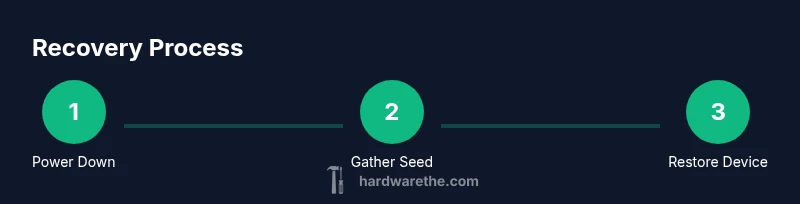
Power down and isolate the damaged wallet
Power off the device and disconnect it from cables to prevent any accidental data exposure or further damage. Do not attempt to repair or boot the device while you are in the recovery workflow. Isolation protects your seed and accounts from attack vectors that could otherwise exploit a malfunctioning device.
Tip: Keep the damaged unit physically separated from your workstation to reduce risk of accidental data leakage. - 2
Gather your recovery seed and backups
Bring together your 12-24 word recovery phrase and your offline backup media (paper or metal). Confirm the seed length and that all words are legible and in the correct order. If you have a passphrase, prepare this as well, and ensure you know how it integrates with your seed.
Tip: Double-check word count and order before proceeding to reduce entry errors. - 3
Set up the replacement wallet in recovery mode
Power on the new device and choose the recovery/import option. Confirm you are using a device from a trusted source and that it has current firmware. Do not proceed with any standard setup that would create new wallet data before seed restoration.
Tip: Use a clean, offline device for the initial setup to prevent leakage. - 4
Enter the seed words carefully
Input each seed word exactly as written. Rushing increases the chance of mis-typing, which can compromise access. After entry, verify you have access to the accounts and addresses that match your expectations.
Tip: Read each word aloud back to yourself to catch mistakes early. - 5
Set up new security credentials
Create a new PIN and enable any optional passphrases or biometric protections. These create an additional barrier against unauthorized access after restoration.
Tip: Choose a PIN that's unique and not easily guessable. - 6
Verify seed integrity and account visibility
Check that all wallets, addresses, and tokens reappear as expected. Confirm that you can receive funds to at least one address. If anything looks off, pause and re-check seed input and compatibility.
Tip: If addresses don’t show, re-enter the seed carefully or try a fresh import on a different device. - 7
Perform a small test transaction
If possible, send a tiny amount to verify control over the seed and wallet. This minimizes risk while proving you can sign transactions securely on the new device.
Tip: Only test with a tiny amount you can afford to lose in case of an import issue. - 8
Create fresh backups and store securely
Once restored, create new backups of the seed in multiple secure locations. Update offline storage methods and ensure you can access them even if one location is compromised.
Tip: Keep backups in at least two physically distinct secure locations. - 9
Secure the old device or dispose properly
If the old wallet contains no seed data or it is decommissioned, factory reset it to avoid any data remnants. If it still contains seed data, treat it as a non-trusted device and do not reconnect to online services.
Tip: Do not reuse the damaged device for future seed storage or milestone testing. - 10
Document the process and monitor
Record the steps you took, the device details, firmware versions, and backup locations. Schedule periodic reviews of backups and firmware to ensure continued safety and readiness for future incidents.
Tip: Set a reminder to review backups annually or after major wallet updates.
FAQ
Can I recover funds if I lose my seed phrase?
Without the seed phrase, access to funds is typically not recoverable. Some wallets offer alternative recovery options, but most rely on the seed. Always maintain multiple backups.
Without your seed phrase, recovery is usually not possible; backups and secure storage are essential.
Is it safe to import my seed on a computer connected to the internet?
No. Seed entry should be done on a trusted, offline device to avoid malware capture. Online machines are high risk and can compromise seed material.
Seed should only be entered on an offline device to prevent malware capture.
How long does a typical restoration take?
Restoration often takes 15-60 minutes depending on device and seed accuracy. Allow time for careful input and verification before transferring funds.
Most restores take under an hour, but take your time to verify each step.
What should I do with my old wallet after restoration?
If the old wallet is damaged, dispose of it securely or reset it if possible to prevent accidental data leakage. Do not reuse it for seed storage.
Dispose or reset the old wallet securely to prevent data leaks.
Should I test with a large transfer after restoration?
No. Start with a small test transfer to confirm access, then gradually move larger sums as you gain confidence. Review all security steps first.
Begin with a tiny transfer to confirm control before moving larger amounts.
Watch Video
Main Points
- Assess damage first to prevent data exposure
- Always restore on a secure, offline device
- Keep multiple, independent seed backups offline
- Verify seed integrity and addresses before heavy transactions
- Document the recovery workflow for future resilience