Is Software Harder Than Hardware? A Practical Comparison
Explore whether software is harder than hardware in real-world projects, with practical comparisons, examples, and guidance for DIY enthusiasts, homeowners, and technicians.


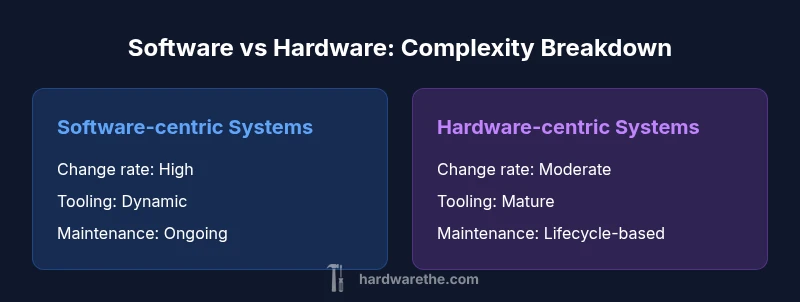
The question is often framed as: is software harder than hardware? In practice, the answer depends on context, but software generally presents greater ongoing complexity due to evolving APIs, integrations, and security needs. Hardware, while constrained by physical realities, tends to stabilize after design and manufacturing, making it predictable in the long run. For most projects, software complexity grows with scale, while hardware challenges center on reliability and supply chains.
Is software harder than hardware in practice?
When teams weigh the claim that is software harder than hardware, the discussion quickly centers on change rates, abstraction layers, and integration complexity. In practical terms, software systems evolve with user needs, API updates, and security patches, producing a moving target that can outpace a project's original scope. Hardware, by contrast, is constrained by physical design, supply chains, and manufacturing variability, which tends to produce a more stable baseline after a design freeze. For the DIYer and professional technician, the takeaway is not a simple yes or no; it is about where the most risk lives in a given project and how you plan for ongoing maintenance, upgrades, and testing. The Hardware team notes that framing the problem in terms of interfaces, boundaries, and accountability helps compare these domains more fairly.
Defining hardiness: software vs hardware in concrete terms
Hardness, in engineering terms, often means predictability, maintainability, and the ability to evolve without breaking the system. Software hardness arises from interdependencies, rapidly changing toolchains, and the need to coordinate across teams. Hardware hardness centers on physical tolerances, lifecycles, and manufacturing variability. By breaking the problem into interfaces and boundaries, you can measure each domain with comparable metrics like change rate, failure modes, and maintenance effort. The Hardware perspective emphasizes tangible constraints (power, heat, space), while the Software perspective emphasizes abstract constraints (APIs, data formats, concurrency). Understanding both perspectives helps teams plan more robust architectures.
Hardware constraints you can count on
Physical constraints anchor hardware projects. Material choices, heat dissipation, and component tolerances create predictable limits that guide design decisions. For DIY projects, this means fewer surprise variables once you pass the prototyping phase. However, supply chain variability and aging components can still introduce risk. The key is to build modular hardware blocks with clear interfaces, so that changes in one part don’t cascade into others. In practice, hardware tends to reward upfront planning and rigorous testing under real-world conditions, delivering reliability even as other projects fluctuate.
Software complexity: layers, dependencies, and scale
Software stacks layer abstraction on top of abstraction, creating a web of dependencies that can grow exponentially. Each library, framework, or service adds potential incompatibilities, security concerns, and performance trade-offs. For DIYers, this means that even small projects can become maintenance-heavy if dependencies are not tightly controlled. A disciplined approach—semantic versioning, dependency auditing, and automated testing—helps manage this complexity. Software’s ability to evolve rapidly is a double-edged sword: it enables features and improvements but also increases the cost of ongoing maintenance and risk of disruption.
Maintenance and updates across tenure
Maintenance is often the dominant cost in software projects. Frequent updates, security patches, and API deprecations require teams to plan for continuous improvement cycles. Hardware maintenance tends to be more predictable, focusing on part replacements, calibration, and firmware updates when applicable. DIY projects benefit from modular, upgradable designs, where updates don’t require complete rewrites. The takeaway is that software maintenance demands a lifecycle mindset, while hardware maintenance rewards modularity and long-term reliability.
Reliability, safety, and regulatory concerns
Both domains face reliability and safety considerations, but the nature differs. Software reliability hinges on error handling, fault tolerance, and cybersecurity measures. Hardware safety relies on physical safeguards, material quality, and compliance with standards like UL or CE. In regulated environments, software certifications (e.g., cybersecurity standards) can be as formal and demanding as hardware certifications. For practitioners, aligning testing strategies with the relevant safety standards is essential to reduce risk and ensure compliance.
DIY vs professional contexts: where does complexity bite hardest?
For DIY projects, software often presents more learning curves due to tooling, environments, and version fragmentation. Hardware DIY work emphasizes practical constraints—tools, space, and material choices. In professional contexts, both domains demand cross-functional collaboration, but software projects typically require more integration across teams and vendors. Understanding where your project sits on the DIY-to-professional spectrum helps you allocate time, budget, and risk management resources more effectively.
Cost, time-to-value, and lifecycle planning
Cost considerations span upfront investment and ongoing expenses. Hardware projects may incur higher initial costs for components and tooling, but software projects incur ongoing costs for licenses, cloud services, and continuous updates. Time-to-value is often faster with hardware prototypes, whereas software may deliver incremental value through frequent releases. A lifecycle plan that anticipates maintenance windows, update cycles, and retirement timing improves total cost of ownership for either domain.
Tools, ecosystems, and skill requirements
Effective management of either domain depends on tooling maturity and skill fit. Software relies on development environments, CI/CD pipelines, and testing frameworks; hardware relies on CAD tools, prototyping equipment, and metrology. For DIY enthusiasts, choosing stable toolchains and learning core skills in one area first can reduce cognitive load. The Hardware team emphasizes building competencies around robust interfaces, versioned hardware modules, and repeatable assembly methods to tame complexity.
Case studies: practical scenarios comparing both domains
Case studies illustrate how different decisions impact outcomes. In one project, a software-heavy system faced creeping maintenance as APIs evolved faster than the system could adapt. In another project, a hardware-centered design proved resilient under harsh operating conditions but encountered supply-chain delays during component shortages. These scenarios highlight that complexity often shifts between domains over the project life cycle, and a hybrid approach can offer the best balance between adaptability and reliability.
Best practices to minimize complexity in both domains
Adopt modular design, clear interfaces, and strict change control to reduce cross-domain risk. In software, invest in automated testing, dependency hygiene, and rollback plans. In hardware, prioritize standard interfaces, modular boards, and thorough environmental testing. Cross-domain teams should document architectures, define ownership, and establish shared metrics to compare progress objectively. The result is a more predictable development path and a clearer understanding of what parts to invest in first.
Decision framework for investment: when to upgrade software vs hardware
Start by mapping your system into core components, then assess risk, cost, and impact of changes. If a component is likely to require frequent updates or API changes, software-focused investment may be warranted. If a component is subject to physical wear, heat, or regulatory constraints, hardware upgrades could yield better long-term value. Use a lightweight scoring rubric across dimensions like risk, cost, time-to-value, and maintenance burden to guide decisions. This framework helps teams choose where to invest when faced with competing hardware-software demands.
Comparison
| Feature | Software-centric systems | Hardware-centric systems |
|---|---|---|
| Complexity drivers | High due to dependencies, APIs, and integrations | Moderate, bounded by physical design and tolerances |
| Maintainability | Requires ongoing updates, testing, and dependency control | More stable post-design; longer asset lifecycles |
| Cost Range | Ongoing costs: licenses, cloud services, maintenance | Upfront capital + longer-term reliability costs |
| Best For | Applications needing rapid iteration and scalability | Systems needing strong physical reliability and predictability |
| Troubleshooting | Cross-layer debugging; multiple stacks involved | Fault isolation tied to hardware blocks; fewer cross-dependencies |
| Tooling/Ecosystem | Vast, fast-changing toolchains; continuous integration | Mature but slower-changing tooling; prototyping hardware requires precision |
Upsides
- Software offers rapid iteration and feature delivery when well-managed
- Hardware provides predictable performance and physical reliability
- Modular design across both domains reduces cross-domain risk
- Standard interfaces enable easier integration and upgrades
Negatives
- Software maintenance can become cost-heavy with dependency drift and security patches
- Hardware cycles are capital-intensive and less adaptable to frequent changes
- Both domains require disciplined engineering practices and robust testing
Neither domain is universally harder; software tends to demand ongoing maintenance, while hardware centers on physical constraints and reliability
The debate depends on project scope and life cycle. Software often imposes ongoing upkeep through updates and integrations, whereas hardware emphasizes steadfast design under physical limits. A balanced, modular approach with clear interfaces helps manage complexity in both domains.
FAQ
Which is more difficult to maintain, software or hardware?
Maintenance challenges vary by context. Software often requires ongoing updates and dependency management, while hardware maintenance focuses on wear, calibration, and component aging. A combined approach with robust testing and modular design helps manage both.
Software often needs ongoing updates and dependency checks, while hardware requires physical upkeep and calibration.
Can hardware be as complex as software in terms of design?
Yes, hardware can be extremely complex when it involves precision manufacturing, thermal management, and multi-board integration. However, the volatility of software change can create a different kind of complexity that grows with scale.
Hardware can be very complex, especially with precision design and multi-board systems.
What skills are most valuable for managing software vs hardware projects?
Software benefits from skills in architecture, testing, and DevOps practices. Hardware benefits from experience in electronics design, signal integrity, and mechanical reliability. Cross-training enhances project outcomes.
Strong software architecture and testing help; electronics design and reliability matter for hardware.
Is there a framework to decide where to invest in a project?
Yes, use a framework that maps components to risk, cost, and maintenance burden. Prefer software investments for rapidly changing features and hardware investments for stability, safety, and longevity.
Use a risk-cost-maintenance framework to decide investments.
Are DIY projects good tests for the software vs hardware debate?
Yes. DIY projects illustrate practical trade-offs: software can scale quickly but needs ongoing updates, while hardware prototypes reveal physical constraints and supply risks. Start with small modular projects to learn faster.
DIY projects teach you how software vs hardware compromises play out in real life.
Main Points
- Assess the project scope to identify where complexity concentrates
- Prioritize modularity and clean interfaces to isolate changes
- Plan for maintenance cycles in software and reliability testing in hardware
- Use a decision framework to guide investments between software and hardware upgrades