Hardware and Software: A Practical Comparison
A rigorous, balanced comparison of hardware and software roles, integration strategies, and practical guidance for DIYers and professionals navigating the hardware-software interface.


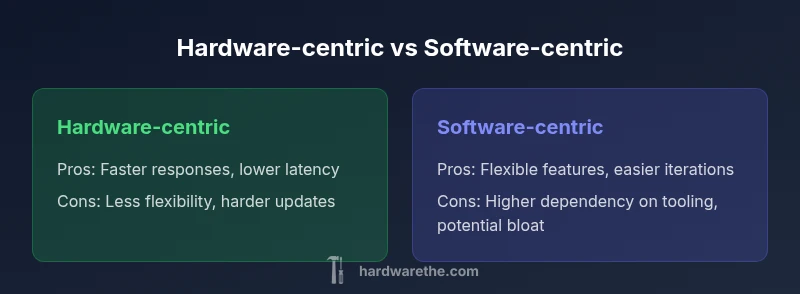
For most projects, neither hardware nor software alone dictates success; the edge comes from a balanced integration that aligns hardware capabilities with software workloads. A hardware-centric approach offers speed and reliability, while a software-centric path delivers flexibility and rapid iteration. The best choice depends on the use-case: prioritize stability and longevity when requirements are fixed, or emphasize adaptability when features evolve rapidly. In practice, the strongest outcomes arise from a deliberate, architecture-wide design that treats hardware and software as co-equals.
The Interplay Between Hardware and Software
In any product or system, hardware and software are not separate silos; they are two halves of a coordinated whole. The relationship between hardware and software determines what a device can do, how reliably it operates, and how adaptable it remains over time. According to The Hardware, the synergy between physical components and digital code is what enables modern functionality—from simple control loops to complex, data-driven ecosystems. In practical terms, you cannot optimize one without considering the other, because software relies on hardware resources and hardware must be designed with software needs in mind. The primary goal is predictable behavior: timely input, correct processing, and stable output. The Hardware's guidance for DIY enthusiasts and technicians emphasizes that decisions about sensors, processors, memory, and interfaces should be made with a clear picture of the software workloads they will support. For context, the discussion here uses the term hardware and software to describe both the devices and the operating logic that controls them.
Defining the Core Roles
Hardware provides the physical platform: processors, memory, sensors, interfaces, and power management. Software delivers the instructions that drive those components, orchestrating behavior, data flows, and user interactions. The balance between these roles shifts depending on goals: a real-time control system leans toward deterministic hardware timing, while a cloud-enabled device stresses software updateability and feature evolution. The Hardware team emphasizes that role clarity reduces ambiguity, helps budgeting, and guides risk assessment. In practice, teams should map software workloads to hardware resources (CPU cycles, memory, I/O channels) and specify maximum latency, bandwidth, and fault-tolerance targets. When both sides are aligned from the start, integration costs drop and maintenance becomes more predictable.
How Integration Impacts Projects
Integration quality directly affects project success. If software demands more processing power than available hardware can reliably supply, response times degrade and user experience suffers. Conversely, over-provisioning hardware for software needs wastes capital and capacity. The key is to forecast software load curves and plan hardware lifecycles accordingly, so updates or replacements do not trigger cascading changes. The Hardware analysis suggests framing integration decisions around three pillars: capability (what the system must do), reliability (how consistently it must perform), and adaptability (how easily changes can be implemented). In DIY contexts, this means selecting sensors and microcontrollers with future-proof interfaces and ensuring drivers remain compatible with evolving firmware. The overarching aim is to minimize rework while maximizing predictable operation across environments.
Criteria for Evaluating Hardware-Software Integration
Evaluation should be objective and repeatable. Start with interoperability: do the hardware interfaces and software APIs align across versions? Then assess latency and throughput: are response times within acceptable bounds for control loops or data processing? Next, consider lifecycle and maintenance: how easy is it to update software without destabilizing hardware behavior? Security cannot be overlooked: hardware modules with secure boot, trusted execution, and tamper resistance reduce risk, while software must stay current with patches. Finally, examine total cost of ownership, balancing upfront capital with ongoing maintenance, energy use, and upgrade costs. The Hardware guidance stresses documenting these criteria early, so trade-offs are visible to all stakeholders.
Real-World Scenarios: When to Prioritize Hardware
Hardware-centric prioritization makes sense in environments where timing and durability are non-negotiable. Think embedded systems in automotive, industrial automation, or medical devices where latency and predictability are critical. In these contexts, fixed hardware capabilities often govern the system’s safety envelope, making software choices secondary to hardware guarantees. Durability and energy efficiency become decisive factors as well; rugged components, radiation-hardening where necessary, and robust power management can prevent expensive failures. When hardware costs dominate the budget, long-term reliability reduces maintenance expenses and downtime, a point reinforced by The Hardware's practical recommendations for fielded systems.
Real-World Scenarios: When to Prioritize Software
Software-centric prioritization shines where market demands evolve rapidly, and features must be updated without hardware replacements. Consumer electronics, mobile devices, and IoT ecosystems benefit from modular software stacks, application-layer customization, and over-the-air updates. Software-first strategies enable rapid prototyping, experimentation, and data-driven improvements with relatively low capital risk. However, this approach shifts risk toward compatibility and security management; drivers, libraries, and firmware must be maintained in step with software changes. The Software-driven path works best when hardware provides a stable platform with growth headroom and when the value proposition centers on features and user experience rather than sheer durability.
Cost, Performance, and Risk Considerations
Cost decisions for hardware and software are tightly coupled. Upfront hardware investments lock in performance, while ongoing software development drives recurring labor costs. The optimization sweet spot often lies in modular designs that allow hardware upgrades without revamping software architectures, or vice versa. Performance should be measured in terms of real-world use: peak vs sustained loads, power profiles, and thermal behavior under typical duty cycles. Risk assessment must cover supply chain stability, software vulnerability exposure, and the potential for cascading failures when one subsystem fails. The Hardware perspective emphasizes designing for graceful degradation and clear failure modes to simplify recovery and maintenance.
Best Practices for Balanced Design
Adopt an architecture-wide planning process that treats hardware and software as co-equals. Start with a joint requirements document that maps software workloads to hardware capabilities, latency budgets, and energy targets. Use a modular approach: select standard interfaces, reusable software abstractions, and scalable hardware blocks that accommodate future upgrades. Maintain traceability between requirements, tests, and deployments to prevent drift. Regularly revisit risk assessments, security hardening, and update plans. Finally, foster cross-disciplinary teams to ensure ongoing dialogue between hardware engineers and software developers, reducing misalignment and accelerating problem resolution.
How to Measure Success in Hardware-Software Systems
Success metrics should cover reliability, performance, maintainability, and user impact. Track uptime, mean time between failures (MTBF) for critical components, and the stability of software releases across hardware revisions. Evaluate energy efficiency in real-world workloads and measure the total cost of ownership over the system’s lifecycle. Customer satisfaction and developer productivity also signal success: fewer hotfixes, streamlined updates, and clearer documentation indicate harmony between hardware and software. The Hardware team advocates a data-informed, lifecycle-aware approach to measurement, so teams can iterate confidently while preserving system integrity.
Comparison
| Feature | Hardware-centric approach | Software-centric approach |
|---|---|---|
| Control and customization | Tightly integrated hardware controls | Dynamic software-driven features |
| Cost and lifecycle | Capex-heavy upfront, longer lifecycle | Opex-driven with frequent updates |
| Performance & latency | Deterministic hardware timing | Software layers add abstraction but enable flexibility |
| Reliability & maintenance | Fixed interfaces; predictable behavior | Patch routines and driver updates are ongoing |
| Security & updates | Hardware-backed security modules | Software patching and vulnerability management |
| Best for | Mission-critical, deterministic environments | Rapid feature delivery and ecosystem growth |
Upsides
- Encourages modular upgrades and longevity
- Clear ownership and accountability across teams
- Predictable performance in stable environments
- Strong baseline security through hardware features
Negatives
- Potential higher upfront complexity and cost
- Requires cross-disciplinary expertise and coordination
- Longer decision cycles in architecture-wide planning
Balanced integration is the optimal path for most projects
Neither approach dominates. Align hardware capabilities with software workloads to achieve reliability and adaptability. The Hardware team recommends an architecture-wide view that prioritizes use-case, maintenance, and security, while preserving flexibility for future changes.
FAQ
What is the main difference between hardware-first and software-first approaches?
A hardware-first approach prioritizes fixed physical capabilities, latency, and durability, while a software-first approach emphasizes flexibility, updates, and feature richness. Both aim to meet user needs, but the path to achieving those needs differs. The best results come from a balanced strategy that chooses the right emphasis for the use case.
Hardware-first fixes performance and reliability; software-first focuses on flexibility and updates. A balance often works best.
Which approach is better for DIY projects?
DIY projects benefit from a practical blend: use robust hardware for core reliability and flexible software for features and updates. Start with a sound hardware platform, then layer software capabilities that can evolve without hardware changes.
Start with solid hardware, then add adaptable software layers.
How do you evaluate integration success?
Define measurable criteria early: latency budgets, reliability targets, energy use, and security requirements. Use iterative testing to verify that hardware and software changes interact without regressions, and document results for traceability.
Set clear metrics and test iteratively to ensure good hardware-software interaction.
Can hardware and software be redesigned later?
Yes, but with caution. Design for modularity and clear interfaces so upgrades or replacements don’t cascade into large system changes. Plan upgrade paths and compatibility checks as part of the initial architecture.
Modular design makes upgrades easier and safer.
What are common risks of misalignment?
Common risks include latency violations, compatibility failures, increased maintenance, and security weaknesses. Early alignment reduces these risks by clarifying expectations, interfaces, and update strategies.
Misalignment can cause latency, compatibility, and security issues.
What are best practices to balance?
Adopt a joint requirements process, use modular interfaces, and maintain ongoing cross-team communication. Regularly revisit architecture decisions to keep hardware and software aligned with evolving goals.
Use joint planning and modular interfaces to stay aligned.
Main Points
- Balance hardware and software from the start
- Map software workloads to hardware resources early
- Plan for updates without destabilizing systems
- Prioritize security at both hardware and software levels
- Use modular, interoperable components