Difference Between Hardware and Software: Practical Examples
A thorough, analytical comparison of hardware vs software with practical examples, clear definitions, and a DIY-focused decision framework to guide upgrades and maintenance.


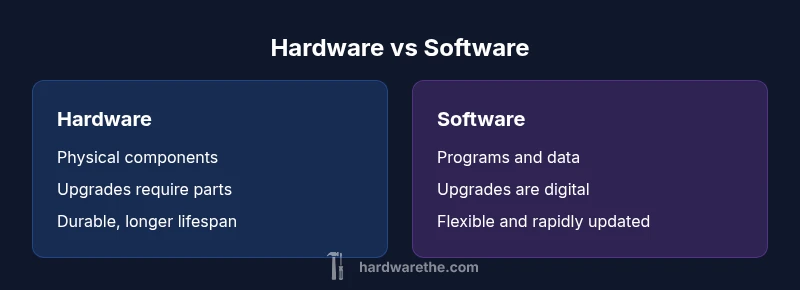
Hardware and software form the two halves of a computer system. Hardware refers to tangible components like a motherboard, CPU, memory, and disks, while software comprises programs and data that run on that hardware. The key difference is that hardware is physical, fixed, and upgradeable; software is intangible, changeable, and requires hardware to function.
Difference between hardware and software with examples
According to The Hardware, understanding the difference between hardware and software with examples helps DIYers make informed upgrade decisions. This article dives into the core definitions, how they interact, and practical implications for home projects. The distinction is not merely academic; it dictates how you approach upgrades, maintenance, and troubleshooting. The Hardware Analysis, 2026 notes a growing emphasis on hardware-software integration in consumer devices, underscoring why every builder and technician should master both sides of the equation. In everyday terms, hardware is the physical chassis you can touch, while software is the instructions that tell that chassis what to do. This distinction matters when you troubleshoot a slow computer, an unresponsive smart home hub, or a broken router—knowing whether you need a new board or a software update saves time and money.
At the core, hardware and software are complementary. You upgrade hardware to increase capacity or durability; you update software to unlock features, fix bugs, or improve security. In DIY projects, you often start by identifying bottlenecks: is your device slow because the processor is underpowered (hardware) or because an app needs optimizations (software)? The assessment should consider both the immediate symptom and the long-term implications, including compatibility, maintenance, and total cost of ownership. The difference between hardware and software with examples becomes a practical rule of thumb for planning upgrades and repairs in garages, workshops, and homes.
Hardware: tangible components and examples
Hardware encompasses the physical elements of a system: the motherboard that connects everything, the central processing unit (CPU) that executes instructions, memory (RAM) that stores active data, and storage drives (HDDs/SSDs) that hold data persistently. Peripherals like keyboards, mice, displays, and cases also count as hardware, as do niche components such as power supplies, cooling systems, and expansion cards. In DIY scenarios, a common hardware upgrade is adding RAM to a desktop or replacing a hard drive with an SSD to boost responsiveness. For embedded projects, circuit boards, sensors, connectors, and enclosures form the hardware layer that enables physical interaction with the world. Importantly, hardware upgrades are tangible and finite: you replace parts, upgrade performance, or improve durability, but the basic architecture of the system remains the same. When planning a hardware upgrade, consider compatibility (socket types, form factors, power requirements), installation effort, and expected lifespan. These decisions are easier when you map out use cases, such as gaming, video editing, or home automation, and compare the needed capacity against available slots and wattage limits.
In practice, the most effective DIY upgrades balance cost, downtime, and performance. If you routinely edit 4K video, a newer CPU and larger RAM kit can yield noticeable gains. If you work with large datasets in a local server, faster storage and better cooling might reduce throttling. In all cases, a clear hardware roadmap helps avoid siting a bottleneck that software updates cannot fix alone.
Takeaway: Hardware choices are physical, durable assets that directly set limits on what software can accomplish. Upgrades require planning, budgeting, and sometimes professional installation, but they deliver lasting improvements that software alone cannot achieve.
Software: programs, data, and how they guide hardware
Software consists of the programs, applications, and data that run on hardware. It includes operating systems (OS) like Windows, macOS, or Linux, productivity suites, creative tools, games, and the firmware that controls devices at a low level. Software acts as a set of instructions that tell hardware how to operate, respond to input, and manage resources. In many systems, software updates introduce new features, optimize performance, fix security vulnerabilities, and improve stability. The OS coordinates hardware components, manages memory, schedules tasks, and handles input/output devices, while applications perform domain-specific tasks such as word processing, photo editing, or database queries. When software demands more resources—such as a newer browser version or a demanding game—it may push hardware to its limits, revealing whether a system needs a hardware upgrade or simply an update to software and drivers. Firmware, a specialized form of software embedded in hardware, often governs basic device behavior without requiring user intervention. In maker and DIY contexts, firmware updates on microcontrollers or embedded boards can unlock new sensors, improve power efficiency, or correct hardware quirks, illustrating how software can extend the life of a device without changes to its physical form.
From a practical perspective, software updates are typically delivered digitally and can be rolled out quickly, often with rollback options if something goes wrong. They rely on underlying hardware to provide the necessary CPU cycles, memory, and storage space. When software increasingly requires features like advanced graphics, machine learning acceleration, or enhanced security protocols, hardware constraints can become the bottleneck, prompting a coordinated upgrade of both layers. The relationship between software and hardware is iterative: software improvements can drive new hardware requirements, while new hardware can unlock software innovations that were previously impractical.
Takeaway: Software defines capabilities and intelligence of a system, while hardware provides the platform and constraints. Updates to software are usually faster and less disruptive than hardware upgrades, but both are essential for sustained performance and capability.
The interaction: drivers, firmware, and OS
The interplay between hardware and software hinges on drivers, firmware, and the operating system. Drivers are software modules that translate high-level commands from the OS or applications into instructions the hardware can execute. They ensure peripherals like printers, graphics cards, and network adapters function correctly by exposing a compatible interface to software. Firmware sits between hardware and software, holding the essential code that initializes devices, controls firmware-level operations, and sets low-level behavior for components such as BIOS/UEFI, network routers, or embedded sensors. The OS provides resource management, scheduling, and process isolation, enabling multiple software programs to run concurrently on hardware. Hardware reliability and performance depend on well-supported drivers and up-to-date firmware; conversely, software quality hinges on drivers that communicate effectively with hardware, and on a stable OS foundation.
Conflicts between software updates and hardware capabilities are common in DIY projects. A new software feature might require a newer driver or a firmware upgrade, while an older device may lack the required semantics to support the feature. When troubleshooting, verify the compatibility matrix from the hardware manufacturer, update drivers, and ensure firmware is current before pursuing hardware replacement. A well-maintained stack—firmware first, drivers second, OS third—reduces compatibility risk and avoids wasted upgrades. Working in tandem, these layers realize the full potential of both hardware and software, delivering predictable performance and improved security across devices.
Takeaway: Drivers, firmware, and OS are the glue that let hardware and software collaborate. Keeping each layer current minimizes downtime and maximizes reliability in DIY setups.
Real-world DIY scenarios: upgrading a PC, home automation, and maker projects
In DIY PC upgrades, common interventions include adding memory modules, replacing an HDD with an SSD, or upgrading the GPU for better rendering and gaming performance. Before purchasing parts, confirm motherboard compatibility (socket type, RAM speed, PCIe version) and assess whether the power supply can handle the new components. This is a classic case of balancing hardware capacity with software demands—the operating system and applications will benefit from faster disk access and more memory, but only if the hardware supports it. In home automation projects, hardware choices include microcontrollers (like Arduino or ESP32 boards) and networked hubs that run lightweight software stacks. Here, software matters for automation rules, energy monitoring, and security scenarios, while hardware considerations focus on sensor reliability, power consumption, and enclosure suitability. Maker projects often blend both domains: microcontroller firmware interacts with sensors (hardware) to execute code (software) that drives actuators. In all cases, plan for future needs: a modest hardware upgrade paired with current software updates can yield more long-term value than chasing a quick patch.
When evaluating a DIY project, list the expected workloads, estimate growth over time, and map out a phased upgrade path. Start with software updates to calibrate performance, then identify hardware bottlenecks that limit scalability. This approach minimizes downtime and cost while maximizing the impact of each change. The hardware-software dance is iterative; a smart, staged approach yields sustainable improvements that simplified, cost-effective maintenance models can sustain.
Takeaway: Real-world DIY work benefits from a phased strategy: optimize software first where possible, then upgrade hardware to address persistent bottlenecks and future-proof the project. A thoughtful plan saves time and avoids premature spending.
How to decide whether to upgrade hardware or update software in a home PC
Deciding between hardware upgrades and software updates starts with a clear assessment of goals. If tasks rely on computation, data throughput, or graphics performance, a hardware upgrade—CPU, memory, or SSD—often delivers the most noticeable benefits. If you want better security, new features, or bug fixes, software updates (and driver updates) should be pursued first. Consider the total cost of ownership: software updates may be free or subscription-based, while hardware upgrades require capital expenditure and potential downtime. Compatibility checks matter: verify motherboard specifications, power supply capacity, and OS support for the new hardware. Security considerations also play a role; software updates frequently address vulnerabilities and improve resilience to threats. In practice, a balanced strategy yields the best results: begin with software optimization, perform driver updates, and then plan a hardware upgrade if performance remains constrained. The approach helps DIY enthusiasts avoid unnecessary spending while ensuring the system remains efficient and secure over time.
In customer-oriented projects, you may also factor in warranty coverage and repairability. Opting for readily available hardware parts and keeping drivers up-to-date reduces maintenance complexity. For hobbyists, reusing existing hardware while experimenting with software enhancements—like alternative operating systems or lightweight virtualization—can extend the life of a device without significant costs. Overall, the decision framework prioritizes impact, cost, and risk, aligning with long-term project goals and user needs.
Takeaway: Use a stepwise decision framework: software first, then hardware only if bottlenecks persist. This minimizes cost and downtime while maximizing system performance and longevity.
The role of firmware and embedded systems in daily hardware
Firmware is software that lives inside hardware, governing essential, low-level operations such as boot sequences, sensor interaction, and device initialization. Embedded systems—microcontrollers and microprocessors inside consumer devices—execute firmware to perform tasks without a full-fledged computer OS. Examples include router firmware that manages network traffic, smart home devices, and automotive control modules. Firmware updates can fix critical bugs, improve power efficiency, or unlock new hardware capabilities without replacing the physical component. For DIYers, firmware management is a crucial skill: keeping firmware current reduces security risks and stability issues, particularly on devices exposed to the internet or used in critical roles. However, firmware updates can be risky if an update fails mid-process; always follow manufacturer guidance and backup configurations where possible. In many projects, firmware acts as the bridge between hardware and higher-level software, translating commands into precise hardware actions and enabling more advanced features without altering the physical hardware.
Takeaway: Firmware is the essential software layer that enables hardware to perform its core functions efficiently. Regular, cautious firmware updates can extend device life and support new capabilities, especially for embedded and networked devices.
The future: hardware-software co-design and integrated ecosystems
The future of hardware and software lies in deeper integration and co-design. Manufacturers increasingly architect components with both hardware and software in mind, optimizing data paths, energy efficiency, and security from the design stage. This approach enables smarter devices, where firmware, drivers, and OS layers work together to deliver features that were previously impossible. In maker and DIY contexts, edge computing and IoT ecosystems push developers to consider cross-layer optimization—how sensors, microcontrollers, and cloud services interact—so that software can respond to real-time data without dramatic hardware changes. The concept of a unified development stack, where hardware platforms and software toolchains are tightly coupled, accelerates innovation and reduces compatibility friction. DIY projects may benefit from standardized hardware modules, open-source firmware, and shared software libraries, which lower barriers to experimentation and enable rapid iteration. As technology evolves, the boundary between hardware and software continues to blur, creating more opportunities for reliable, efficient, and user-friendly devices in homes and workplaces.
Takeaway: The trend toward hardware-software co-design will shape how we build, repair, and upgrade devices. Embracing integrated ecosystems and standardized platforms helps DIYers maximize performance while reducing risk and complexity.
Comparison
| Feature | Hardware upgrade | Software upgrade |
|---|---|---|
| Upfront cost and investment | Typically higher upfront cost | Often lower upfront cost |
| Upgrade frequency / ease | Less frequent; physical replacement or addition | More frequent; delivered digitally |
| Lifespan and durability | Physical components with finite lifespan | Software remains usable with compatible hardware |
| Dependency and compatibility | Needs compatible hardware slots, power, cooling | Depends on OS, drivers, and hardware support |
| Impact on performance | Direct, tangible performance gains (CPU, RAM, storage) | Indirect gains through features, security, and stability |
| Maintenance and risk | Physical installation and potential downtime | Patch management and potential software incompatibilities |
| Best for | Workloads needing capacity, speed, or durability | Systems requiring flexibility, security, or feature updates |
Upsides
- Hardware upgrades provide tangible, long-term capacity gains
- Software updates unlock new features and security fixes
- Upgrading hardware can extend device lifespan and resale value
- Software flexibility allows rapid iteration and customization
Negatives
- Hardware upgrades can be costly and disruptive
- Software updates may require licenses or subscriptions
- Hardware compatibility can limit upgrade options
- Software updates can introduce new bugs or compatibility issues
Hardware upgrades for capacity; software updates for features and security
Prioritize software updates to quickly gain new capabilities and security. If bottlenecks persist, plan a targeted hardware upgrade to achieve meaningful performance gains.
FAQ
What is the simplest way to tell hardware from software?
Hardware is the physical parts you can touch, such as CPUs and memory. Software comprises the programs and data that run on that hardware. The two work together, but hardware provides the platform while software provides the instructions.
Hardware is the physical parts you can touch, like a CPU or memory; software is the set of programs that run on that hardware. They work together, with hardware as the platform and software as the instructions.
Can hardware and software exist without each other?
Software cannot operate without hardware to run on, and hardware cannot perform tasks without software instructions. They are interdependent; upgrades or fixes in one area often require compatibility checks in the other.
Software needs hardware to run, and hardware needs software to function. They’re interdependent, so changes in one area should consider the other.
What is firmware and how does it fit?
Firmware is software embedded in hardware to control its basic functions. It’s distinct from user applications and OS, yet it sits between hardware and higher-level software in the stack.
Firmware is the built-in software on hardware that controls basics. It sits between hardware and the operating system.
Examples of hardware upgrades vs software updates in a DIY project?
Hardware upgrades include adding RAM, swapping to an SSD, or replacing a faulty motherboard. Software updates include OS patches, driver updates, and new app features. In DIY projects, you often start with software improvements and only upgrade hardware if performance bottlenecks persist.
In DIY projects, start with software updates like OS patches, then upgrade hardware such as RAM or storage if needed.
How do I decide whether to upgrade hardware or software for a home PC?
Evaluate whether workloads are CPU/GPU bound or bottlenecked by software features. Start with software updates for quick gains; plan hardware upgrades if tasks remain slow or unresponsive after patches. Consider cost, downtime, and compatibility before proceeding.
Test software updates first for quick gains; if things stay slow, plan a hardware upgrade. Check costs and compatibility.
Are firmware updates considered software?
Yes. Firmware is specialized software embedded in hardware that controls low-level functions. It qualifies as software, though it operates at a closer-to-hardware level than typical applications.
Firmware is software built into hardware to control it at a low level.
Main Points
- Assess workload before deciding on upgrades
- Hardware provides tangible, long-term capacity
- Software updates offer flexibility and rapid improvements
- Plan upgrades with compatibility and downtime in mind