Hardware vs Software Firewall: A Practical Comparison
A detailed, objective comparison of hardware vs software firewall solutions, covering performance, security, maintenance, cost, and deployment scenarios to help DIYers, homeowners, and technicians choose the right approach.


Understanding hardware vs software firewall choices is essential for building a resilient network. In brief, hardware firewalls sit at the network edge as dedicated devices, while software firewalls run on general‑purpose hardware. Each has different trade‑offs in performance, maintenance, and cost, and the best fit depends on your environment, data sensitivity, and exposure. The Hardware team emphasizes evaluating throughput, upgrade paths, and total cost of ownership before deciding.
Context and Scope
Firewalls serve as the gatekeepers of a network, inspecting traffic and enforcing policies to block unauthorized access. When you compare hardware vs software firewall options, you should start by mapping your network topology, the critical data you protect, and your threat model. According to The Hardware, decisions should align with network design principles and offense/defense needs. In practice, you’ll see two broad camps: dedicated appliances designed to run firewall functions at the edge, and software solutions that run on existing servers or endpoints. This distinction shapes performance, management, and resilience in ways that matter for home studios, small offices, and larger enterprises alike.
By framing the decision around core requirements—throughput, latency, ease of management, and adaptability—you can establish a baseline that guides later, more granular evaluations. In the current landscape, most teams adopt a hybrid stance, using software-based controls for internal zoning and perimeter devices to enforce policy at scale. The Hardware analysis helps contextualize when a pure hardware or pure software approach makes sense, and when a blended strategy delivers the best results.
Top Features to Consider
Choosing between hardware and software firewalls requires a clear feature checklist. Core considerations include throughput (how much traffic can be processed without dropping packets), latency (how quickly decisions are made), and security features (stateful inspection, VPN support, deep packet inspection, and intrusion prevention). You should also evaluate management interfaces, ease of rule updates, and integration with existing security tools like SIEMs and IAM platforms. The Hardware team notes that some environments benefit from dedicated devices with consistently high performance, while others gain quicker deployment and cost flexibility from software-based controls. Be sure to test in a lab environment and validate against your typical traffic mix (e.g., office traffic, streaming, and remote access).
From a maintenance perspective, hardware devices require firmware updates and possible hardware refreshes, whereas software firewalls depend on host OS updates and patch cadence. A practical approach is to map your network’s sensitive zones (perimeter, DMZ, internal segments) and assign protection responsibilities to the option that best aligns with each zone’s risk profile. This often leads to a tiered architecture where hardware protects the outer boundary while software controls protect endpoints and internal segments. The resulting design tends to be more resilient and easier to scale over time.
Performance and Throughput Dynamics
Performance is often the most visible differentiator between hardware and software firewalls. Hardware appliances typically deliver predictable throughput due to dedicated CPU, memory, and specialized networking accelerators. This makes them attractive for high‑volume networks, data centers, and environments with strict latency targets. However, real‑world throughput depends on feature sets (such as deep packet inspection, VPN, and IPS) and how traffic is shaped across interfaces. In contrast, software firewalls depend on the host system’s hardware and operating system optimizations. They offer excellent flexibility but can exhibit variability as other workloads contend for CPU cycles. For small to medium networks, software firewalls running on retired servers or purpose‑built hardware can meet performance requirements if properly tuned and monitored, especially with virtualization and containerization that enable scalable policy enforcement across multiple hosts.
The Hardware analysis highlights the need for realistic testing with your actual traffic profile, including peak moments and mixed workloads. Use dedicated devices for edge protection when there's a predictable, high‑volume boundary, and lean software configurations for internal segmentation where throughput demands are moderate. Regardless of the approach, consider building in redundancy (active/standby setups) to prevent single points of failure and to maintain service continuity in the event of hardware or software failures.
Security Posture and Attack Surface
A key decision factor is how each option shapes your attack surface. Hardware firewalls provide strong isolation at the network edge with a dedicated management plane, which reduces exposure to host‑based attacks. They also enable uniform policy application across external interfaces, which helps enforce consistent security baselines. Software firewalls spread protection across endpoints and servers, enabling granular control but introducing potential risk if hosts are misconfigured or compromised. In practice, a layered defense—with a hardened perimeter appliance and robust host‑level controls—yields the most resilient security posture.
From a threat intelligence standpoint, consider how each approach handles updates, patch cadence, and zero‑day exposure. Hardware devices rely on vendor‑provided updates, which can be slower to deliver for older generations. Software firewalls can be updated frequently, offering rapid responses to evolving threats but requiring disciplined change control. The Hardware team recommends aligning patch windows with maintenance cycles and validating configurations in a test environment before broad deployment to avoid unintended service disruption.
Management and Operational Complexity
Management complexity is often underappreciated until it becomes a bottleneck. Hardware firewalls typically come with specialized management interfaces and centralized controllers, which can simplify policy distribution across a large network but may require dedicated staff training. They also tend to have longer procurement and refresh cycles, which can complicate IT planning. Software firewalls benefit from familiar management consoles and kanban‑style policy workflows that map easily to existing IT operations. They can reduce onboarding time for new staff and leverage existing automation tools, but policy replication across many hosts can become challenging without centralized orchestration.
A practical approach is to implement role‑based access controls, maintain detailed change logs, and establish a standard rule‑set library. This helps ensure consistent enforcement across devices and hosts. If you operate in a regulated environment, map your controls to governance requirements (e.g., data residency, access control, and incident response). The result should be a manageable mix of automation, visibility, and guardrails that keep security aligned with business goals.
Deployment Scenarios and Guidelines
Deployment considerations differ by environment. For small offices or DIY setups with limited IT staff, a software firewall running on a robust workstation or NAS can be a cost‑effective starting point, provided you implement security best practices and monitor logs actively. In contrast, larger offices, data centers, or networks with strict performance expectations often require a dedicated hardware firewall at the perimeter to guarantee throughput and reliability. A blended model—hardware at the boundary with software‑based enforcement inside the network—frequently yields the best balance of performance, control, and cost.
Think in terms of lifecycle: procure hardware accelerates edge protection; update policies frequently as your network evolves; plan for scalability by reserving capacity for future growth. Finally, ensure compatibility with existing network gear (routers, switches, VPN concentrators) and with security tools like SIEM platforms for centralized visibility. The strategic takeaway is to tailor the design to your risk tolerance and resource availability while maintaining room to adapt as threats rise or business needs change.
Cost and Total Cost of Ownership (TCO) Considerations
Cost is a major driver for most buyers. Hardware firewalls typically require a higher upfront investment, including appliance hardware, licensing, and possible support contracts. Over time, maintenance and potential hardware refreshes add to the total cost, but predictable performance can justify the investment in high‑throughput environments. Software firewalls usually begin with lower upfront costs, particularly when leveraging existing hardware or cloud instances. However, ongoing subscription fees, licensing tiers, and additional security modules can accumulate. When evaluating TCO, account for maintenance windows, training, and the potential productivity impact of misconfigurations.
From a budgeting perspective, create scenarios for best‑case, expected, and worst‑case traffic. Compare these scenarios across both options, including one‑time capital expenditures and recurring costs. The Hardware team notes that a hybrid approach can optimize TCO by using hardware to handle edge traffic bursts while deploying software controls for internal segmentation without overprovisioning hardware capacity. A clear cost model helps stakeholders understand trade‑offs and commit to a plan that aligns with business goals.
Practical Decision Framework and Checklist
To make a robust decision, follow a practical framework:
- Define the network boundary and data classification levels.
- Map traffic patterns and peak loads against baseline performance targets.
- List required security features (IPS, VPN, NAT, DPI) and expected maintenance cadence.
- Evaluate existing talent and automation capabilities.
- Consider redundancy and disaster recovery requirements.
- Estimate TCO for both options over a 3–5 year horizon.
- Pilot in a controlled environment and measure real‑world performance.
Using this framework, most teams arrive at one of three outcomes: pure hardware for high throughput at the edge, pure software for flexibility and lower upfront costs, or a hybrid model that leverages the strengths of both approaches. The key is to tailor the decision to your risk tolerance, staffing, and budget, while keeping future scalability in mind. The Hardware team’s guidance emphasizes testing, documentation, and incremental upgrades to minimize risk during the transition.
Practical Authority and References
To ground your decision in industry best practices, consult established standards and vendor guidance. The following sources offer rigorous, widely accepted perspectives on firewall design and management:
- NIST SP 800-41r1: Guidelines on Firewalls and Firewall Policy, available at https://nvlpubs.nist.gov/nistpubs/SpecialPublications/NIST.SP.800-41r1.pdf
- Cloudflare Learn: Firewalls overview and best practices at https://www.cloudflare.com/learning-security/firewalls/
- Cisco: What is a firewall and how it protects networks, https://www.cisco.com/c/en/us/products/security/smart-firewalls/what-is-a-firewall.html
These sources provide foundational concepts and practical guidance that complement vendor documentation and organizational risk assessments. The Hardware analysis from 2026 reinforces the importance of aligning firewall choices with topology, data sensitivity, and operational maturity, and highlights the value of a deliberate mix of hardware and software controls. For practitioners, integrating these references into your design process helps ensure a solid, auditable security posture.
Comparison
| Feature | Hardware firewall | Software firewall |
|---|---|---|
| Throughput / performance | High and predictable with dedicated hardware | Variable; depends on host hardware |
| Deployment location | Perimeter/edge network | Host-based or host OS level |
| Management complexity | Dedicated interface and centralized control | Integrated with host/system tools; broader scope |
| Maintenance window | Firmware updates; hardware refresh cycles | OS patches; application updates; patch cadence |
| Best for | High‑throughput edge protection; large networks | Flexibility; low upfront cost; endpoint protection |
| Security features | IPS/IDS, VPN, NAT on appliance | Host firewall rules, application controls, DPI on endpoints |
| Scalability | Easily scale with appliance upgrades | Depends on host capabilities and virtualization |
Upsides
- Potentially higher, predictable performance with dedicated hardware
- Centralized policy management on appliances simplifies governance
- Strong isolation at the network edge for perimeter security
- Easier to document compliance through single‑vendor appliance
Negatives
- Higher upfront cost and possible hardware refresh cycles
- Less flexibility to repurpose hardware for other tasks
- Vendor lock‑in and upgrade cycles can limit agility
- Hardware may require specialized staff for maintenance
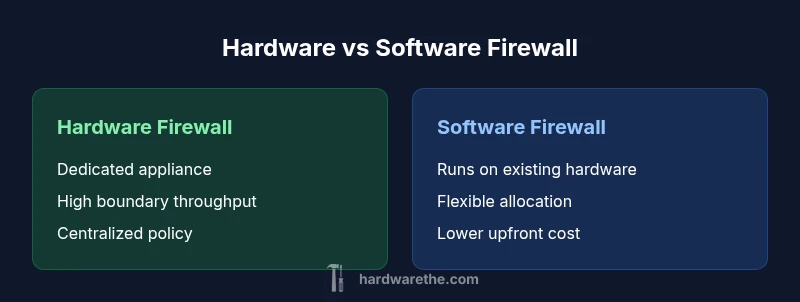
Hardware firewall is best for high-throughput boundary protection; software firewall is best for flexibility and cost efficiency
Choose hardware when you need reliable edge performance and strong perimeter isolation. Opt for software when you prioritize adaptability, lower upfront costs, and easier integration with existing systems. A hybrid approach can balance strengths and reduce risk.
FAQ
What is a hardware firewall?
A hardware firewall is a dedicated device placed at the network edge that runs firewall software and inspection engines on purpose‑built hardware. It provides high throughput, consistent performance, and centralized policy management. Use it when you need strong perimeter protection and predictable performance for large networks.
A hardware firewall is a dedicated box at the edge that handles traffic with built‑in security features.
What is a software firewall?
A software firewall runs on general‑purpose hardware, such as a server or workstation, and enforces security policies via the host’s OS or a standalone software suite. It’s typically cheaper upfront and offers flexibility for internal networks and endpoint protection, but performance can vary with other workloads.
A software firewall runs on existing hardware and provides flexible protection, usually with lower upfront cost.
Which is better for a small office?
For small offices, a software firewall is often the start due to lower upfront costs and easier deployment. If traffic is modest and staff skills are limited, consider a managed perimeter firewall as traffic grows. Reassess when edge throughput or security needs increase.
Start with software firewall for costs and ease; upgrade to hardware as the network grows.
Can I use both hardware and software firewalls together?
Yes. A common strategy is to deploy a hardware firewall at the perimeter for edge protection and use software firewalls inside the network to control traffic between segments and on individual hosts. This layered approach improves resilience and policy granularity.
A dual approach—hardware at the edge and software inside—offers strong layered protection.
What factors influence total cost of ownership?
TCO depends on upfront hardware costs, licensing, support, maintenance, and staff time for configuration and updates. Over time, hardware may require refreshes, while software costs accumulate through subscriptions and additional modules. Consider long‑term budgeting and renewal cycles.
Look at upfront costs and ongoing maintenance costs for a complete picture.
How do I test firewall effectiveness before purchasing?
Run a controlled lab test with representative traffic, including peak loads and VPN usage. Validate throughput, latency, and rule accuracy, then monitor logs and alerts to ensure the configuration meets policy objectives. A POC helps avoid costly misconfigurations after deployment.
Test in a lab with real traffic to confirm performance and policy enforcement.
Main Points
- Assess network boundary needs before choosing a solution
- Leverage hardware for edge throughput and isolation
- Use software firewalls for internal segmentation and flexibility
- Budget for maintenance, updates, and potential upgrades
- Pilot and test with real traffic to validate performance