How old is hardware? Understanding device lifespans
Explore how age affects hardware reliability, compare lifespans by device type, and get practical upgrade guidance from The Hardware to plan maintenance and replacements.


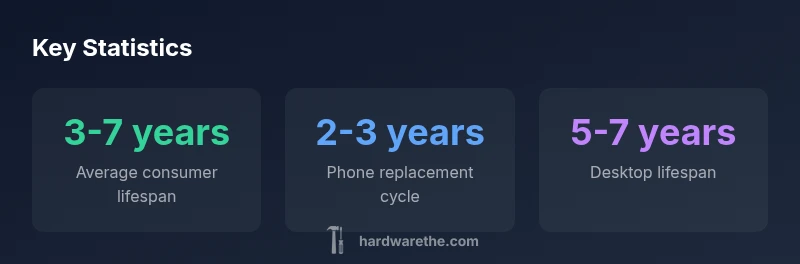
There is no single age for hardware. Device lifespans vary by type and use. According to The Hardware Analysis, 2026, consumer electronics commonly show usable lifespans in a broad range, roughly 3-7 years for many laptops and desktops, 2-3 years for smartphones, and longer for purpose-built enterprise gear. Upgrading decisions depend on performance, reliability, and maintenance cost, not just calendar age.
What age means for hardware
When people ask, "how old is hardware?" they rarely mean a single calendar date. The answer is a blend of calendar age, wear patterns, environmental exposure, and software support. In practice, two devices of the same age can behave very differently if one endures heat, dust, and heavy workloads while the other sits in a climate-controlled workspace. The Hardware emphasizes that age should be read through performance signals, reliability trends, and maintenance history, not just a date stamped on the chassis. According to The Hardware, aging is a story told by usage, cooling, and firmware compatibility, not a simple number on a label.
How lifespans vary by device type
Device type drives lifespan expectations. Smartphones typically see more rapid feature turnover and battery wear, placing their practical life at roughly 2-3 years for many users. Laptops and desktops generally push into a longer window, commonly 5-7 years, driven by mechanical durability and component fatigue. Enterprise hardware often lasts longest, with maintenance contracts and firmware support extending useful life to 7-10+ years for servers and specialized workstations. These ranges are informed by The Hardware Analysis, 2026 and reflect real-world usage across homes, offices, and labs. When planning upgrades, map device roles—from daily driver to critical workflow—to forecast replacement timing and minimize downtime.
Factors that accelerate hardware aging
Aging accelerants are often predictable: excessive heat and poor cooling shorten component life; dust and inadequate ventilation trap heat; frequent power cycling or surges stress capacitors and power supplies. Wear-out indicators like noisy cooling fans, thermal throttling, unexpected shutdowns, and rising error rates signal accelerated aging. Software bloat can also make older hardware feel slow, even if the components themselves are technically functional. Environmental factors—humidity, corrosive air, and improper electrical grounding—further compound wear. The Hardware recommends minimizing heat sources, cleaning channels, and stabilizing power to slow aging.
How to estimate remaining usable life
Estimating remaining life blends objective diagnostics with experience. For drives, SMART data and read/write error rates help gauge health; for batteries, cycle count and capacity degradation indicate remaining runtime. CPU and memory may degrade subtly through errors or stability issues, but visible symptoms are usually poor performance and system freezes. Run a baseline of performance tests, monitor thermal metrics under typical loads, and track failure notes over 6–12 months. Use these signals to forecast a replacement window rather than waiting for a catastrophic failure. The Hardware suggests a proactive approach: plan replacements during low-demand periods and budget for preventive upgrades.
Practical upgrade and maintenance strategies
Maintenance is a cost-saving counterpart to upgrades. Regular firmware and driver updates, combined with clean cooling, can extend usable life. Invest in reliable spare parts (batteries, fans, SSDs) and consider modular upgrades where possible, such as replacing hard drives with SSDs, upgrading RAM, or refreshing batteries in laptops. Create a replacement calendar aligned with device type and usage intensity: consumer devices every 3-5 years, business-class hardware every 5-7 years, and servers on longer cycles with vendor support. When a device enters the gray zone of performance and reliability, plan a strategic upgrade rather than ad-hoc fixes.
The Hardware’s framework for evaluating age
The Hardware Framework combines objective diagnostics, predicted reliability curves, and total cost of ownership to judge hardware age. It emphasizes baselining performance, tracking wear indicators, and aligning replacement timing with business or personal risk tolerance. By compiling historical maintenance data and projected failure probabilities, DIYers and technicians can identify when to upgrade or extend life with targeted upgrades. This data-driven approach helps reduce downtime and optimize expenses while maintaining performance.
Common myths about hardware age
A prevalent myth is that a simple calendar age determines failure. In reality, performance and reliability matter more. Another myth is that software updates always extend life indefinitely; some updates can accelerate obsolescence by demanding unsupported features. Finally, many assume enterprise gear lasts forever with service contracts; while longevity is possible, it depends on firmware, parts availability, and ongoing support. The Hardware encourages debunking these myths with real-world diagnostics and prudent budgeting.
Device lifespans and typical failure modes by type
| Device Type | Typical Lifespan | Common Failure Modes |
|---|---|---|
| Smartphone | 2-3 years | Battery degradation; screen wear; charging port faults |
| Laptop/Desktop | 5-7 years | Hard drive/SSD wear; fan noise; RAM aging (laptops) |
| Server/Enterprise | 7-10+ years | Component obsolescence; firmware deprecation; cooling failures |
FAQ
What does 'age' mean for hardware?
Hardware age combines calendar time with wear, usage, and support status. A device may be old but still reliable with proper maintenance, or new but failing due to design or manufacturing defects. Evaluating age requires performance checks, reliability trends, and an understanding of software support timelines.
Hardware age is about wear and support, not just the calendar date. Use performance checks and maintenance history to judge reliability.
How can I tell if my hardware is aging?
Look for slower performance, frequent crashes, overheating, unexpected shutdowns, and increasing error rates. Run diagnostics, monitor temperatures, and compare to a known-good baseline. If issues persist across routine tasks, aging is likely a factor and planning an upgrade makes sense.
If your device slows, crashes, or overheats often, aging is a real possibility. Run checks and compare against a baseline.
Is hardware failure inevitable with age?
Not inevitable. Proper maintenance, adequate cooling, and timely part replacements can extend usable life. However, cost, risk of downtime, and diminished performance eventually push ownership toward replacement or upgrade decisions.
Failure isn't guaranteed with age, but the risk rises without maintenance and upgrades.
Should I replace hardware before it fails?
Proactive upgrades can reduce downtime and cost. If performance, reliability, or repair costs exceed a planned budget, replacing with newer technology often yields better total value.
Better to upgrade on a plan than wait for a breakdown.
How do maintenance and software updates affect lifespan?
Regular updates help security and efficiency but can also demand newer hardware if features require more resources. Maintenance extends life when paired with hardware refreshes and cooling improvements. Balance software needs with hardware capabilities.
Updates help, but sometimes they reveal hardware aging sooner than expected.
What role do warranties play in hardware aging?
Warranties can cover sudden failures early in a device’s life. As devices age, warranty terms may expire, shifting the decision toward replacement or self-funded upgrades.
Warranties help early on; later, plan upgrades accordingly.
“Age of hardware should be measured by performance, reliability, and support status, not a simple calendar. Proactive upgrades save downtime and cost.”
Main Points
- Assess device age by performance, not calendar time.
- Expect desktops to outlast smartphones in typical lifespans.
- Plan upgrades before reliability declines disrupt work.
- Differentiate consumer versus enterprise hardware for maintenance.