How to Resolve a Fortnite Hardware Ban: Legitimate Appeals
Discover legitimate steps to address a Fortnite hardware ban, understand HWID bans, file a proper appeal with Epic Games, and prevent future penalties.


Hardware bans in Fortnite lock out a device by tying the ban to a hardware identifier, not just a user account. There is no safe shortcut to remove a HWID ban. The proper path is to file a legitimate appeal through Epic Games Support, verify your activity, and follow their guidance. If the ban is permanent, focus on compliant play and wait for any official resolution.
What is a Fortnite hardware ban?
A Fortnite hardware ban, often called a HWID ban, restricts access by tying the ban to a device's unique hardware identifiers. That means even if you change accounts, use a different network, or reinstall the game, you may still be prevented from launching Fortnite on the affected machine. According to The Hardware, these bans are designed to maintain fair play and deter cheating by removing the ability to simply swap devices. If you suspect you’ve been banned unfairly, the first step is to verify the ban type and gather relevant details from Epic Games support channels. The Hardware strongly recommends documenting every communication and being honest about your activity to avoid unnecessary delays.
How Fortnite enforces hardware bans
Fortnite's anti-cheat ecosystem relies on hardware fingerprints, which include components, firmware, and software signals that uniquely identify a device. When cheating is detected or policy violations occur from a device, the game can issue a hardware ban that effectively prevents that device from connecting to Epic's services. The server maintains a list of HWIDs that are associated with bans, and this list is checked during login attempts. Because the ban is tied to the physical device rather than a single account, simply deleting the account or creating a new one won't always restore access on the same machine. This approach underscores how seriously Epic Games takes fair play, and it also means that addressing a hardware ban typically requires official channels rather than ad-hoc workarounds.
Why you might receive a hardware ban
Hardware bans are most commonly triggered by repeated cheating, exploiting game systems, or deliberate rule violations while using the same device. They can also occur if your account was compromised and used for prohibited activity, or if someone else had access to your hardware and violated terms on your behalf. In rare cases, false positives can happen due to misidentified hardware signals or software conflicts. While The Hardware does not condone any unfair behavior, it is important to understand that bans are a protective measure designed to preserve a positive experience for the majority of players. If you believe your device was wrongly flagged, you should prepare to present a clear, factual appeal with supporting evidence.
HWID ban vs account ban
This guide distinguishes hardware bans from account bans. A HWID ban targets the device's hardware signature, potentially affecting all accounts run on that machine, whereas an account ban restricts access tied to a particular Epic Games account. In practice, both can occur independently, and the removal process differs: an account ban typically relies on account recovery and policy review, while a HWID ban requires a formal appeal or verification through Epic Games Support. Understanding the distinction helps you choose the right path and prevents guessing games about what to fix.
Legitimate path: appeal and verification
Legitimate resolution begins with a formal, respectful appeal through Epic Games Support. Start by confirming the exact ban status and collecting any evidence that supports your case, such as purchase receipts, communications, or time-stamped logs from your device. Submitting a well-structured appeal increases your chances of a positive outcome. Be prepared to answer direct questions about your behavior and to provide any requested hardware details. The aim is to show you understand the rules, have not engaged in prohibited activity, and can ensure compliant play moving forward.
Step-by-step: how to prepare an appeal
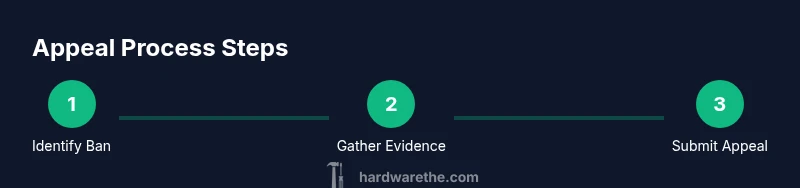
- Identify the ban scope: confirm whether the ban is HWID-based and note any account-related flags. 2) Gather evidence: collect receipts, timestamps, and logs showing your hardware configuration and interactions with Fortnite. 3) Draft a concise appeal: explain what happened, apologize if applicable, and outline steps you will take to prevent future issues. 4) Submit through Epic Games Support: use the official form and attach evidence. 5) Monitor and respond: respond promptly if Epic requests more information. 6) Follow through: implement any recommended changes and verify you meet the Terms of Service.
What to expect after you submit an appeal
Once submitted, the process depends on queue length and the complexity of your case. Epic Games Support may respond with requests for more details or evidence. Resolution times can vary, and not all appeals result in reinstatement. If reinstatement occurs, you’ll receive instructions to restore access on the affected hardware. If the appeal is denied, you may have the option to escalate the case or pursue alternative, policy-compliant paths.
If your appeal is denied: options
Denied appeals typically require reflection on terms and may lead to permanent penalties. You may consider reframing the issue, seeking third-party guidance on compliance, or evaluating whether continued play on the same hardware is feasible under the terms. In some cases, a hardware replacement combined with a compliant behavior plan may be considered, but you should confirm with Epic Games Support first.
How to avoid hardware bans in the future
Adhering to the Fortnite Code of Conduct, avoiding cheating or exploitation, and maintaining software hygiene lowers risk. Keep your system free of third-party tools that modify game behavior. Regularly update drivers and firmware and use a secure network. The Hardware's guidance emphasizes proactive compliance and honest reporting of issues when they occur.
Common myths and misconceptions
Myth: Switching devices automatically unbans you. Reality: Hardware bans are device-tied and require official resolution; Myth: You can simply delete accounts. Reality: HWID bans may persist across accounts; Myth: Appeals are instant. Reality: They take time and require evidence.
Practical checklist for your appeal
Checklist items: confirm ban type; gather ID, receipts; draft a respectful letter; attach logs; submit via official form; track status; avoid creating new accounts during review.
Next steps and resources
Next steps: proceed with the official appeal; check status; learn from the process; consult official resources if needed.
Tools & Materials
- Epic Games account access(Have login credentials ready; ensure you can access the account you believe is affected.)
- Evidence documents(Receipts, timestamps, screenshots, and logs that support your case.)
- Web browser or Epic Games Support app(Used to submit the official appeal form.)
- Stable internet connection(Necessary to submit and monitor your ticket without interruption.)
- Alternative contact method(Optional: a phone or email you can use if support requests follow-ups.)
Steps
Estimated time: 2-3 weeks
- 1
Identify the ban scope
Determine whether the ban is HWID-based or account-based by checking the message from Epic Games and any associated emails. This prevents chasing the wrong resolution path and saves time later.
Tip: Capture the exact wording of the ban notice and note the device used for Fortnite at the time of the incident. - 2
Gather supporting evidence
Collect receipts, timestamps, and hardware details (CPU, GPU, motherboard, BIOS version) that may corroborate your case. Store screenshots of the login screen and any error messages.
Tip: Organize evidence chronologically and label files clearly for quick reference. - 3
Draft a concise appeal
Write a brief, factual explanation of what happened, acknowledge any policy violations if applicable, and outline steps you will take to ensure compliant play in the future.
Tip: Keep the tone respectful and professional; avoid blaming others or making excuses. - 4
Submit through Epic Games Support
Use the official support form or ticket system on Epic Games to submit your appeal, attaching all relevant evidence and a summary of your case.
Tip: Double-check that you are submitting from the account and device that experienced the ban. - 5
Monitor and respond promptly
Check for updates from Epic Games and reply quickly if they request additional information or documents.
Tip: Set aside time for ongoing communication; timely responses can influence the outcome. - 6
Follow through on any recommendations
If Epic provides steps (e.g., firmware updates or security improvements), implement them and document the changes.
Tip: Keep records of any hardware updates and confirm the changes with support if needed.
FAQ
What is a Fortnite hardware ban (HWID ban)?
A HWID ban targets a device’s hardware identifiers, preventing that device from playing Fortnite. It is different from an account ban and typically requires an official appeal to resolve. Providing accurate information and following official channels increases your chances of a fair review.
A hardware ban blocks the device itself rather than a single account, and you must go through Epic Games Support to address it.
Can I appeal a hardware ban?
Yes. Epic Games supports appeals for hardware bans. You’ll need to submit evidence, explain the situation honestly, and show how you will avoid violations in the future. Appeals are reviewed in the official support system and timelines vary.
You can appeal through Epic Games Support with your evidence and a clear plan for compliant play.
Will buying a new PC unban me?
Not automatically. Some HWID bans can carry over to new hardware if linked to broader enforcement measures or account behavior. Always verify policy details with Epic Games before making changes.
Getting a new PC may not guarantee reinstatement; you should follow the official appeal process first.
How long does a hardware ban appeal take?
Resolution times vary based on the queue and case complexity. Be prepared for several days to weeks, and maintain ongoing communication if Epic requests more information.
Review times differ; stay in touch with support and provide requested details promptly.
Are hardware bans permanent?
Some hardware bans can be permanent, depending on the violation and policy. If you believe the ban is erroneous, submit a thorough appeal and follow the guidance from Epic Games Support.
Permanent bans can happen, but you should still appeal with clear evidence.
Watch Video
Main Points
- Understand HWID bans tie to devices, not accounts
- Submit a legitimate, well-documented appeal
- Expect variable review times and respond promptly
- Avoid any circumvention attempts to protect future eligibility