How to Play Fortnite After a Hardware Ban: A Practical Guide
Learn safe, legal steps to resume Fortnite after a hardware ban, including how bans work, how to appeal, and how to use compliant hardware and devices. Practical guidance for DIYers and gamers from The Hardware.


There is no legitimate way to bypass a hardware ban in Fortnite. Epic Games enforces bans on hardware IDs to prevent cheating, and attempting to circumvent them can violate the terms of service. The safe path is to appeal the ban through official channels or wait until it is lifted, then play on devices that meet Epic's requirements. Focus on compliance and fair play while you sort out access.
Understanding Hardware Bans and Why They Happen
Hardware bans target the physical devices used to play Fortnite, often tied to your device's unique identifiers or reported cheating patterns. When Epic Games detects repeated violations or suspicious activity, they may enforce a device-wide ban to prevent alternate accounts from evading punishment. This approach is common across many major online titles to maintain fair play and discourage botting, spoofing, or mass cheating. The Hardware's team notes that bans can be triggered not just by one questionable action, but by patterns across sessions, which is why simply switching USB sticks or reinstalling the game won't always help. If you rely on a single machine or a shared family PC, the consequences can be felt by all users associated with that hardware signature. According to The Hardware, understanding the scope of a ban helps players choose the right next steps—respect the policy, gather required information, and pursue legitimate remedies rather than attempting circumvention.
Tools & Materials
- Epic Games account(Ensure your account is active and the email is accessible.)
- Verified email and 2FA(Set up two-factor authentication for account security.)
- A compliant device(A PC, console, or mobile device that Epic supports for Fortnite.)
- Stable internet connection(Minimum latency for submitting appeals and playing.)
- Documentation of ownership (optional)(Receipts or serial numbers if you need to verify device ownership.)
Steps
Estimated time: 2-14 days
- 1
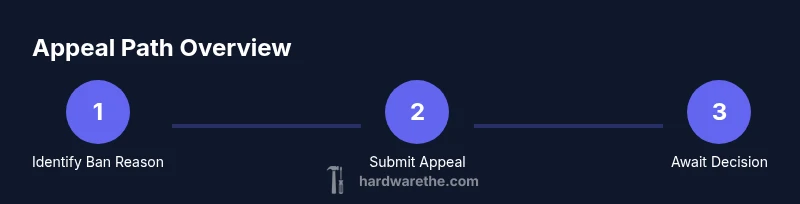
Identify the ban reason
Log in on any compliant device and check the message from Epic Games Support to understand the ban type and any stated duration. This informs your next actions and avoids wasted effort.
Tip: Keep a screenshot of the ban notice and note the date for your records. - 2
Gather account and device information
Collect your Epic Games account details, the devices you used, and any error codes or alerts you saw. This information helps when you submit an appeal and proves you’re organized.
Tip: Prepare a short, factual summary of events leading up to the ban. - 3
Submit an official appeal through Epic Support
Use the official appeal form and provide relevant context, focusing on compliance and corrective steps you’ve taken. Do not request bypasses or circumvention.
Tip: Be respectful and concise; include any evidence of fair play and compliance. - 4
Review Epic’s response and wait for a decision
Epic may take days to weeks to review appeals. Monitor your email for updates and be prepared to supply additional information if asked.
Tip: Avoid creating new accounts during the review period to prevent complicating the case. - 5
Prepare compliant hardware and account setup
If your appeal is successful, set up a device that meets Fortnite’s official requirements and ensure your account is secured and verified.
Tip: Enable device-level protections to prevent future accidental violations. - 6
Re-enter Fortnite on approved hardware
Log in on the approved device after approval and verify you can access online features without triggering new flags.
Tip: Test gameplay in a stable environment to confirm the ban has been resolved.
FAQ
What is a hardware ban in Fortnite?
A hardware ban restricts access by tying the ban to your device’s hardware identifiers, making it difficult to play from that specific device. It is designed to prevent ban evasion and protect fair play across accounts.
A hardware ban locks out the device itself, not just a single account, so new attempts from that hardware are typically blocked.
Can I appeal a hardware ban?
Yes, most hardware bans can be reviewed through Epic Games Support. You should provide a clear, factual appeal with any supporting information and demonstrate steps you’ve taken to ensure fair play. Results vary by case.
Yes, you can appeal, but you should be honest and provide details; outcomes vary.
How long do hardware bans last?
Ban durations vary by case and policy. If a ban is temporary, it will lift after the stated period; if permanent, the process is different and may require further review.
Ban lengths differ; some are temporary, others may require longer reviews.
Can I play Fortnite on a different device after a ban?
If Epic lifts or doesn’t apply a ban to a different device, you may resume playing on an allowed platform. Always use compliant hardware and ensure your new device is not flagged.
You can play on a different device only if Epic allows it after review.
Will using a different account bypass the ban?
Using a separate account to bypass a hardware ban is likely to violate the terms of service and can lead to additional penalties. Always follow official channels.
No—creating a new account to dodge a ban is risky and against the rules.
What should I do if my appeal is denied?
If an appeal is denied, review the feedback, ensure full compliance, and consider seeking further clarification or escalation through official channels. You may refile if policy allows.
If denied, read the feedback carefully and ask for clarification or options through the proper channels.
Watch Video
Main Points
- Never bypass a hardware ban; pursue official remedies.
- Appeal with clear, factual information and compliant hardware.
- Use only devices that Epic explicitly supports for Fortnite afterwards.
- Keep records and respond promptly to Epic’s requests.