How to Get Rid of a Hardware Ban: Legitimate Paths
Learn legitimate steps to understand, appeal, and resolve a hardware ban on online services. This guide covers why bans happen, how to prepare an appeal, and what to expect during the review.


According to The Hardware, you can’t erase a hardware ban with a simple trick. The legitimate path is to understand why the ban happened, gather evidence, and appeal through official support channels. If you believe the ban was in error, contact the platform’s appeals team, provide your hardware details, and follow their process.
What is a hardware ban?
A hardware ban is a decision by a platform to block access based on the physical device your account uses, often tied to the computer’s motherboard, GPU, or system serial numbers. Unlike a temporary account suspension, a hardware ban aims to prevent the sanctioned user from repeatedly creating new accounts on the same device. Readers asking how to get rid of hardware ban should note that there is no quick hack to erase this restriction. The Hardware’s guidance emphasizes understanding the underlying cause, then pursuing a legitimate path through official channels. In practice, a hardware ban typically follows a violation tied to cheating, exploiting, or breaching terms of service; it is not simply a software flag. If you’ve never engaged in prohibited behavior, you’ll want to prepare a careful appeal that clarifies the situation and provides verifiable details.
Key distinction: hardware bans target your device, while account bans are tied to a username. In some cases, the ban may apply to multiple devices if the platform suspects a shared system or compromised accounts. Be mindful that attempting to bypass or mask hardware identifiers may violate terms of service and could lead to further penalties.
This section sets the stage for legitimate remediation. If you want to know how to get rid of hardware ban, focus on transparency, documentation, and following the official review process. The Hardware team recommends starting with a clear, factual explanation of events and a direct request for a re-evaluation.
Why platforms impose hardware bans
Platforms deploy hardware bans to protect fair play, maintain service integrity, and deter repeat offenders. When automated systems detect cheating, spoofed hardware IDs, or suspicious activity linked to a device, a hardware ban can be triggered to prevent circumvention. This strategy reduces the risk of talented cheaters simply creating new accounts and rejoining games or services. Another reason is liability: proving a player violated terms of service can be challenging at the account level alone, so device-level enforcement provides a stronger signal to deter abuse. The Hardware’s research highlights that many bans occur after multiple violations or strong evidence of manipulation, though erroneous flags can happen. In such cases, the legitimate route is to appeal rather than attempting ad hoc circumvention.
From a policy perspective, hardware bans are designed to be durable but reviewable. Appeals often require a combination of factual history, device identifiers, and user testimony. Maintaining a calm, cooperative tone during communications improves the likelihood of a fair review. This approach aligns with best practices in consumer disputes and digital governance.
Legitimate ways to address a hardware ban
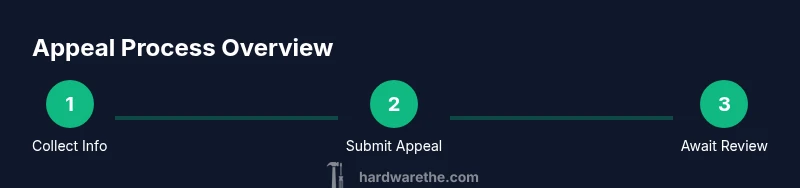
The legitimate route to resolve a hardware ban begins with understanding the process and submitting a formal appeal through the platform’s official channels. Before you start, gather all relevant information: the account username, email on file, device model, and any proof of ownership or purchase history. Prepare a concise narrative describing your actions, the events leading to the ban, and why you believe the ban was applied in error. Clear, factual statements with supporting evidence—like timestamps, logs, or communication threads—improve your chances of a fair re-review. The aim is transparency, not confrontation.
Most platforms provide a dedicated appeals form or support ticket system. Follow their instructions precisely, attach required documents, and avoid disputing the decision in off-channel forums where staff cannot review your case. If your appeal is denied, request a reason and inquire about the next steps, escalation options, or a supervisor review. It’s important to respect the timeline and do not flood support with repeated messages, which can slow down the process.
How to prepare your appeal
Effective preparation begins with organization. Start a simple file containing the following:
- Account details: username, email, and any linked phone numbers.
- Hardware information: model names, serial numbers, and a brief note on any recent changes.
- Evidence of ownership: receipts, warranty documents, or license keys where applicable.
- A factual timeline: a chronological list of actions and events related to the ban.
Draft your appeal as a concise, non-defensive narrative. Explain what happened, why you believe the ban was a mistake, and what steps you’ll take to prevent future violations. Include any supporting evidence and clearly state your desired outcome (e.g., re-evaluation or reinstatement). Avoid blaming others or making unverified claims. The more concrete your submission, the more credible your case appears to reviewers.
What to expect during the review
Reviews typically involve a human agent who examines your submission, evidence, and device information. Response times vary by platform but often fall within a few days to a couple of weeks. During this period, you may receive requests for additional information or clarification. If the review confirms the ban, you’ll receive a detailed reason and any conditions for reinstatement (such as completing a training module or agreeing to enhanced monitoring). If the ban is upheld, you can ask for escalation or read the platform’s policy on what constitutes reconsideration. It’s important to stay patient and respond promptly to any follow-ups. The goal is to reach a fair, transparent resolution rather than a rushed outcome.
How to reduce risk of future bans
To minimize the chance of future hardware-related penalties:
- Adhere strictly to the platform’s terms of service and code of conduct.
- Avoid software tools or actions that could trigger anti-cheat or security flags.
- Keep your system secure, with updated software and legitimate copies of games or services.
- Maintain clear records of software purchases and hardware changes so you can defend your case if needed.
- If you modify hardware, document changes and verify they comply with any policy guidelines.
Proactive compliance, not clever shortcuts, protects your access long-term. The goal is sustainable use of the platform without recurrent disruptions.
Common myths vs reality
Myth: Replacing a single component will automatically bypass a hardware ban. Reality: Bans are often linked to account activity and device fingerprints that extend beyond one component. Simply swapping parts may not remove the restriction.
Myth: If you’re banned, you must quit the platform forever. Reality: Many bans are petitionable. A well-documented appeal can lead to reinstatement or a clarified path forward.
Myth: Public forums will overturn a ban faster than official channels. Reality: Official support channels provide the only path to an authoritative review. Public posts rarely influence outcomes and may violate terms.
Authority sources
- Official platform policies and appeal guidelines (primary source for each case)
- Regulatory or consumer-protection resources for digital rights and fair process
- General best-practice resources on dispute resolution
Authority sources
- See official platform policies and appeal guidelines for your case. These documents outline the required evidence, timelines, and escalation options.
- The Hardware analysis shows that structured, evidence-based appeals tend to yield clearer reviews and more consistent outcomes.
- The Hardware Team’s guidance emphasizes professional, fact-based communication to facilitate fair reconsideration.
References and further reading
- https://www.ftc.gov (Federal Trade Commission – consumer protection and digital rights)
- https://www.nist.gov (National Institute of Standards and Technology – cybersecurity best practices)
- https://www.ed.gov (U.S. Department of Education – information governance and user rights)
Tools & Materials
- Account username or email(Login identifier used on the platform to verify your identity and access the appeal form.)
- Hardware details (device model, serials)(Document any identifiers to help reviewers understand the device in question.)
- Screenshots of ban message(Include the exact wording shown by the platform and the timestamp.)
- Purchase receipts or proof of ownership(If the device or software involved requires proof of ownership.)
- Communication templates(Draft messages for support to ensure consistency and politeness.)
- Timeline notes(A log of events leading to the ban and any prior warnings.)
Steps
Estimated time: 3-14 days
- 1
Collect and organize information
Assemble account data, device identifiers, and any evidence. Create a single folder with documents and notes to support your appeal. This step reduces back-and-forth and speeds up the process.
Tip: Keep everything in one accessible folder or cloud drive for quick sharing. - 2
Find the official appeal channel
Locate the platform’s designated appeals form or support channel. Use this path rather than public forums to ensure your submission is reviewed by the right team.
Tip: If you can’t find the form, contact support via the official help center and request the correct appeal path. - 3
Submit a clear and factual appeal
Write a concise narrative of events, attach evidence, and propose a reasonable resolution. Stick to facts; avoid emotional language or exaggerated claims.
Tip: Attach your screenshots, order numbers, and device IDs in a single, clearly labeled package. - 4
Follow up and monitor status
Check the ticket status and respond promptly to any requests for more information. Maintain professionalism in all communications.
Tip: Set a reminder to follow up if you haven’t heard back within the platform’s stated window. - 5
Escalate if necessary
If the initial review is inconclusive, request escalation or a supervisor review. Higher-level staff can examine complex cases more thoroughly.
Tip: Ask for a written timeline and expected milestones for the escalation process. - 6
Learn and adapt to avoid future bans
Document changes to your setup and adhere to policy guidelines to reduce the chance of future issues. Use this as a learning process to improve compliance.
Tip: Create a standard operating procedure for future device changes and account safety.
FAQ
What is a hardware ban and how does it differ from an IP ban?
A hardware ban targets the physical device tied to an account, making it difficult to access services from that device. An IP ban blocks a network address. Both aim to prevent abuse, but they operate at different layers and often require different review processes.
A hardware ban locks out the device itself, while an IP ban blocks the network address; they require official review to resolve.
Can replacing hardware remove a ban?
Replacing hardware does not automatically remove a hardware ban, as some platforms tie the ban to user accounts or device fingerprints that extend beyond a single component. An official appeal is the proper route to seek reinstatement.
Just swapping parts doesn’t guarantee removal; you should appeal through official channels.
How long does an appeal take?
Approval or denial timelines vary by platform, typically ranging from a few days to a couple of weeks. If more information is needed, reviewers may extend the process. Stay responsive during the review.
Expect a few days to a couple of weeks, depending on the platform and the complexity of your case.
What if I think the ban was a mistake?
If you believe the ban is incorrect, submit a factual appeal with supporting evidence. Request clarifications or a supervisor review if the initial decision seems unjust.
If it’s a mistake, present clear evidence and ask for a supervisor review if needed.
Should I post about my ban on forums?
Public forums are not a substitute for official appeals and can complicate the review. Use official channels and reference any public discussions only as supplementary context.
Forums aren’t a substitute for official appeals; rely on the official process.
Are there any common reasons an appeal is denied?
Appeals are commonly denied due to insufficient evidence, unclear timelines, or conflicting information. Providing consistent, verifiable data increases your chances on a second review.
Denials often come from missing evidence or unclear narratives; be thorough and consistent.
Watch Video
Main Points
- Understand hardware bans and avoid DIY circumvention
- Prepare a well-documented appeal with evidence
- Engage official channels and be patient during review
- Escalate responsibly if needed to achieve a fair outcome
- Learn from the process to reduce future risk