What to Do with Old PC Hardware: A Practical DIY Guide
A practical, safety-focused guide to handling old PC hardware through repurposing, donating, recycling, and responsible disposal. Learn step-by-step actions, safety tips, and where to get official help.


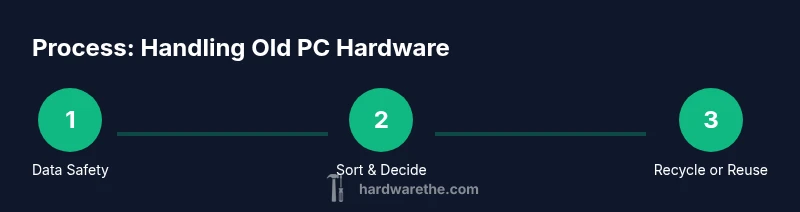
Goal: determine how to handle old PC hardware. You can repurpose, donate, recycle, or responsibly dispose of it. Before anything, securely erase drives and back up data. Then sort components by salvageable value and choose the best path: refurbish for reuse, donate to schools or nonprofits, or recycle through accredited programs.
Why repurposing old PC hardware matters
According to The Hardware, responsible handling of what to do with old pc hardware matters for the environment, your budget, and your own learning. The “reuse economy” reduces demand for new components, minimizes e-waste, and inspires creative DIY projects for the home office, workshop, or tech lab. For the DIY enthusiast or homeowner, salvaging a few usable parts from a tired desktop can power a budget NAS, a media center, or a retro gaming rig. The Hardware Team emphasizes that every salvageable drive, RAM stick, or motherboard kept out of a landfill contributes to a more sustainable tech cycle. In this guide, we’ll explore practical paths—from safe data wiping to creative repurposing—that help you extend life even when a machine is obsolete.
Safety-first: data destruction and handling
Before touching hardware, establish a safe workspace and a data-safety plan. The biggest risk with old PC hardware is residual data on drives. Always back up anything you still need, then erase or physically destroy sensitive data when required. Use manufacturer or trusted third-party tools to perform secure erases on HDDs and SSDs. Wear anti-static protection and handle boards by edges to avoid damaging traces. If a device is beyond repair, separate plastics, metals, and hazardous components for appropriate disposal. The Hardware recommends a cautious, methodical approach to data sanitization to prevent data breaches and ensure compliant disposal.
What parts are worth saving and why
Not every component holds value, but several common parts can be repurposed or refurbished. RAM modules and power supplies often find new life in hobby builds or as spare parts for a home server. CPUs and GPUs may require compatible motherboards or cooling enhancements but can still power budget projects. Hard drives provide storage for DIY NAS setups when data is securely erased. Silenced fans, enclosures, and PCIe cards can upgrade a current system or stock a parts closet for quick repairs. The decision to save or skip a part depends on condition, market demand, and whether the component supports a safe, practical project.
How to salvage and repurpose
Start by removing drives and data-bearing components, then categorize parts into keep, donate, sell, or recycle bins. Clean parts with isopropyl alcohol, document any defects, and photograph items for listings or records. For DIY projects, repurpose parts into a home lab, a cooling-based mini-ITX build, or a dedicated media server. If a monitor, keyboard, or case still works, document compatibility needs and organize cabling for easy future use. Wipes and simple testing with a power supply adapter can help you verify basic functionality before committing to a project. The goal is deliberate, safe repurposing rather than hasty landfill disposal.
Donation, resale, and giving parts a second life
Donating is a strong option for non-profits, schools, and repair cafes that can breathe new life into older hardware. Check local community centers or school tech programs that accept functional parts or working machines. If you plan to resell, present accurate condition information and disclose any issues. Certified refurbishers can take salvageable devices for professional restoration and resale. Even when parts aren’t perfectly new, repurposed components can support budget-friendly builds or educational labs. The Hardware supports helping others access hands-on tech experience while reducing waste.
Recycling and responsible disposal
When parts are no longer useful, route them to accredited e-waste recyclers or manufacturer take-back programs. Recyclers separate metals, plastics, and circuit boards to recover valuable materials and reduce hazardous waste. Look for certifications such as R2 or eSTEPS and ensure facilities follow state or federal rules. Manufacturer take-back programs often cover older devices too, making it easy to return machines for proper processing. If you’re unsure, contact local waste management for a recommended e-waste partner. The Hardware emphasizes choosing recyclers who provide data-safe handling and transparent material recovery reporting.
Common pitfalls and timing
Avoid impulsive decisions: don’t dump hardware before data is erased or before checking for local take-back options. Don’t mix electronics with general curbside trash, and don’t assume every part has resale value. Timing matters: larger hardware cycles benefit from planned projects or donation drives rather than last-minute scrapping. Create a simple inventory and a timeline for processing, so you don’t accumulate parts in clutter. The key is to align your actions with local programs and climate-friendly practices, not just convenience.
AUTHORITY SOURCES and best-practice reading
For deeper guidance, consult official sources on electronics recycling and e-waste management. The EPA provides recommendations on responsibly managing electronics, while energy-focused agencies discuss recycling programs and energy-efficient options. The FTC offers consumer guidance on safe disposal and protecting data. These sources can help you make informed, compliant decisions about old PC hardware handling.
CONCLUSION: practical wrap-up and next steps
Handling old pc hardware is a practical blend of reuse, safe data handling, and responsible recycling. The The Hardware Team’s recommended approach is to start with data sanitization, then salvage useful parts for new projects, donate where possible, and recycle the rest through certified programs. By planning, you’ll minimize waste, maximize learning, and protect your information while contributing to a greener tech ecosystem.
Tools & Materials
- Phillips head screwdriver (#2)(For opening cases and fasteners)
- Anti-static wrist strap or mat(Prevent electrostatic damage)
- Isopropyl alcohol (90%+)(Clean components and fans)
- Lint-free wipes(Use with alcohol on surfaces)
- External USB drive or USB-C drive(Back up data before erasure)
- Data wiping software or manufacturer tool(Secure erase for HDD/SSD)
- Labeling supplies (markers, sticky notes)(Keep parts organized)
- Small bins or trays for sorting(Prevent cross-contamination of parts)
Steps
Estimated time: 60-120 minutes
- 1
Prepare workspace and backup data
Create a clean, static-safe workspace. Connect a USB drive to back up any data you may still need. Verify backups before proceeding.
Tip: Label the backup drive with date and device model for easy retrieval. - 2
Wipe data securely from drives
Run a secure erase on HDDs and SSDs using trusted tools. For drives with sensitive data, perform multiple passes as recommended by the tool.
Tip: Physically disconnect drives before testing other components to avoid accidental data exposure. - 3
Open cases and sort components
Power down and unplug devices. Remove covers and carefully extract drives, RAM, GPUs, and expansion cards. Place items into labeled bins: keep, donate, resell, recycle.
Tip: Keep screws in a labeled container to avoid losing fasteners during reassembly or disposal. - 4
Assess salvage value of parts
Inspect for signs of wear, corrosion, or overheating. Prioritize saving items with known compatibility in current or near-term projects.
Tip: Document condition with photos for future reference or sale listings. - 5
Decide the best path for each item
Assign each part to reuse, donation, resale, or recycling. Use local options to avoid unnecessary shipping and to support community programs.
Tip: When in doubt, contact a local repair café or electronics recycler for guidance. - 6
Store or transport parts safely
Seal small parts in anti-static bags or containers. Transport to donation sites or recycling centers as soon as possible to minimize risk of loss.
Tip: Avoid stacking heavy parts on delicate boards; use padded storage.
FAQ
What are the best ways to permanently erase data from old hard drives?
Use trusted data-wiping tools that support multi-pass erasure and verify completion. For sensitive devices, consider a combined software wipe followed by physical destruction of the drive’s plates if allowed by policy.
Use a trusted data-wipe tool and verify the wipe. For sensitive data, consider a follow-up physical destruction only if permitted by policy.
Can I donate old PC hardware to schools or nonprofits?
Yes, many schools and nonprofits accept refurbished parts or working machines. Check with local organizations or repair cafes, and disclose any compatibility or performance limitations.
Yes, many groups accept refurbished parts. Check with local schools or repair cafes and be transparent about condition.
Is it safe to refurbish and reuse computer components?
Refurbs can be safe when you test each component, ensure proper cooling, and maintain up-to-date firmware where possible. Avoid risky upgrades if compatibility is uncertain.
Refurbs are safe if you test components and confirm compatibility. Don’t push unsafe upgrades.
Where can I recycle electronics responsibly?
Look for certified e-waste recyclers or manufacturer take-back programs. Ensure they provide data-safe handling and transparent material recovery information.
Find certified e-waste recyclers or take-back programs that guarantee safe data handling.
Are there legal requirements for data on disposed hardware?
Data-priority laws vary by location. Generally, you must sanitize data before disposal and follow local regulations on e-waste handling.
Regulations vary, but sanitize data and follow local e-waste rules.
Watch Video
Main Points
- Plan your handling workflow before touching hardware
- Data sanitization is non-negotiable for security
- Sort parts to maximize salvage or donation value
- Choose certified recycling or take-back programs
- Document everything for accountability and learning