How to Manage Hardware Inventory: A Practical Guide
A practical, step-by-step guide to how to manage hardware inventory for DIYers and technicians. Learn to track assets, optimize procurement, and prevent stockouts with a reliable system that scales with your workspace. This guide reflects expert guidance from The Hardware and keeps you on a steady path from setup to audits.


You will learn how to manage hardware inventory with a practical, step-by-step method. Start by defining your assets, choosing a scalable tracking system, labeling each item, and establishing audit cadences. This quick guide highlights essential data fields, recommended tools, and how to transform chaotic stock into reliable, accessible records. By the end, you'll be ready to implement a repeatable process that reduces loss and makes procurement smoother.
Why hardware inventory matters in practice
According to The Hardware, an accurate hardware inventory isn't just a list—it's a backbone for safe, efficient operations. When assets are tracked from receipt to retirement, you gain visibility into where your gear lives, what it costs, and when it should be replaced. DIY enthusiasts, homeowners, and technicians benefit from a system that reduces downtime, accelerates procurement, and improves maintenance scheduling. In practice, a reliable inventory helps with warranty claims, audits, and compliance, while enabling smarter decisions about spares and upgrades. This section shows how even modest environments can reap meaningful benefits from consistent labeling, timely data capture, and routine checks. The goal is to create a traceable chain of custody for every asset, from the smallest screwdriver kit to a full server rack. A disciplined inventory also strengthens vendor negotiations and lifecycle planning, so you’re never guessing about what you have or what you need next.
Core principles of successful hardware inventory
Successful hardware inventory rests on a few core principles that keep chaos at bay. First, data accuracy beats fancy tools alone—without correct data, even the best system fails. Second, standardization matters: define a small, fixed set of fields and stick to them across all asset types. Third, labeling and location mapping are non-negotiable; you must know where a device lives, who uses it, and its status at any moment. Fourth, lifecycle visibility ensures you can plan for replacements, repairs, or retirement well before critical failures occur. Finally, governance matters: assign ownership, establish approval workflows for moves or disposals, and review the process periodically to prevent drift. In practice, weave these principles into your daily routines so that inventory becomes a natural part of operations, not a separate project. When teams share a single source of truth, procurement, maintenance, and support become faster, more accurate, and less frustrating for everyone involved.
Tools and data model essentials
To build a reliable hardware inventory, you need a lean data model and reliable tools. Start with a central asset repository that supports barcode or RFID scanning and easy data import/export. Key data fields should include: assetTag or SKU, serial number, model, location, owner or custodian, status (in use, in repair, retired), purchase date, and warranty information if available. Organize assets by logical categories such as Servers, Networking, Peripherals, andTools. Implement a standardized labeling system with durable barcodes to keep records in sync with physical items. Pair the system with a simple audit checklist to verify every asset at regular intervals. Finally, ensure integrations with procurement or maintenance workflows so updates flow across systems automatically and stay current. This combination of minimal data fields, dependable labels, and consistent checks makes the inventory robust and scalable.
Setup architecture and governance
Effective hardware inventory requires both a sound architecture and clear governance. Start by defining roles: a data steward to maintain the asset database, asset owners for accountability, and a small auditing subset to perform physical checks. Establish a change workflow for adding new assets, moving items between locations, and retiring devices. Choose a tracking system that aligns with your team size and workflows; asset management software with mobile scanning features reduces manual work and errors. Create and document standard operating procedures (SOPs) for data entry, labeling, transfers, and audits. This documentation becomes your playbook, ensuring new team members can onboard quickly and consistently. Finally, plan a phased rollout: pilot in one department or area, capture lessons, then scale across the organization. The Hardware emphasizes that a strong governance frame is as crucial as the right tools for sustained success.
Maintaining accuracy through audits and automation
Maintaining accuracy is an ongoing effort that benefits from a blend of human checks and automation. Schedule quarterly physical audits to reconcile records with reality, and use barcode scans during every asset movement to update status and location in real time. Where possible, automate data capture to reduce transcription errors—automatic imports from purchasing systems, or integrations with maintenance tickets, can keep the asset record current with minimal manual intervention. In addition, implement validation rules in the data model: ensure mandatory fields are filled, enforce accepted value lists for status, and require owner attribution for active assets. The Hardware research suggests that consistent audits paired with scanning-driven updates dramatically reduce data drift and improve decision-making, even in mid-sized operations. Remember, the goal is a living inventory that adapts as your hardware footprint evolves.
Common challenges and practical remedies
No system is perfect from day one. Common challenges include data drift from ad hoc updates, mislabeling during moves, and a lack of buy-in from users who feel overwhelmed by the process. Remedies are straightforward: keep the data model lean, require scans for asset moves, and provide clear training with hands-on practice. Make it easy to adopt by starting small—a pilot area can reveal gaps in SOPs, labeling clarity, and data normalization needs. Regular refresher training, quick-reference cheatsheets, and rewards for those who maintain accuracy help sustain engagement. The Hardware Team notes that the best inventories emerge from consistent habits, simple tools, and explicit ownership. If you hit a snag, revisit the core data fields, confirm asset ownership, and adjust workflows to minimize friction. The end goal is a reliable, scalable system that your team actually uses.
Tools & Materials
- Asset management software(Choose a scalable solution with barcode/RFID support)
- Barcode labels and printer(Durable, scannable labels for all assets)
- Barcode scanner or smartphone with camera(For quick asset data capture)
- Data model template(Core fields: SKU/assetTag, serial, location, owner, status)
- Audit checklist(Quarterly physical checks and reconciliations)
- Procurement integration plan(Optional: link to purchasing workflows)
Steps
Estimated time: 2-4 weeks for setup and first audit
- 1
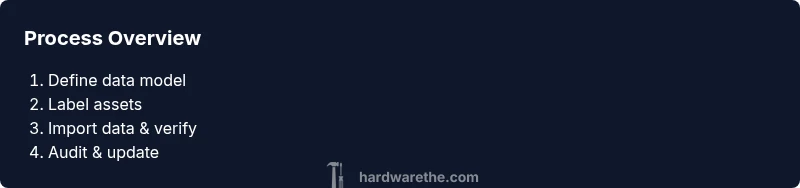
Define inventory scope and data model
Establish what counts as hardware assets and which data fields are mandatory. Create a single source of truth for asset data.
Tip: Start with essential fields only to avoid over-complication. - 2
Select a tracking system and categorize assets
Pick a system that fits your scale and supports barcodes. Build categories like Servers, Networking Gear, Peripherals, Tools.
Tip: Favor systems with easy import/export and mobile scanning. - 3
Label assets and assign unique IDs
Print durable barcodes and attach them to each asset. Ensure each item maps to a data record.
Tip: Test readability on all asset surfaces. - 4
Migrate existing data and verify records
Import current asset data and perform a physical verification to reconcile data with reality.
Tip: Run a pilot audit on a small subset before full rollout. - 5
Put in place ongoing updates and audits
Define how assets move, retire, or get repaired, and schedule quarterly audits.
Tip: Automate reminders and reconciliation routines. - 6
Create dashboards and governance
Develop reports for stock levels, asset age, and procurement forecasts; establish ownership.
Tip: Use color cues to highlight critical gaps.
FAQ
What is hardware inventory management and why does it matter?
Hardware inventory management tracks physical assets from receipt to retirement, reducing loss and misplacement while improving procurement decisions.
Hardware inventory management tracks assets from receipt to retirement to reduce loss and improve procurement.
Which data fields are essential for asset records?
Core fields include asset ID, serial, model, location, owner, status, and purchase date to enable traceability.
Key fields are ID, serial, location, owner, status, and purchase date.
How often should audits be performed?
Quarterly audits keep records accurate and help identify discrepancies early.
Do audits every quarter to stay accurate.
Can I use mobile devices for scanning assets?
Yes, many inventory apps support cameras for scanning and syncing with the central system.
Yes, you can scan with a phone and sync later.
What metrics should I monitor?
Monitor stock on hand, turnover rate, aging assets, and procurement forecast accuracy.
Track stock levels and procurement forecasts.
Watch Video
Main Points
- Define a concise data model and stick to it
- Label all assets with scannable IDs
- Run quarterly audits to maintain accuracy
- Use dashboards to drive procurement decisions
- Integrate with purchasing workflows for efficiency