Is hardware the same as firmware? A practical comparison
A practical, analytical guide distinguishing hardware from firmware, how they interact, and what it means for DIY projects. Learn to tell them apart, how updates work, and when upgrades matter.


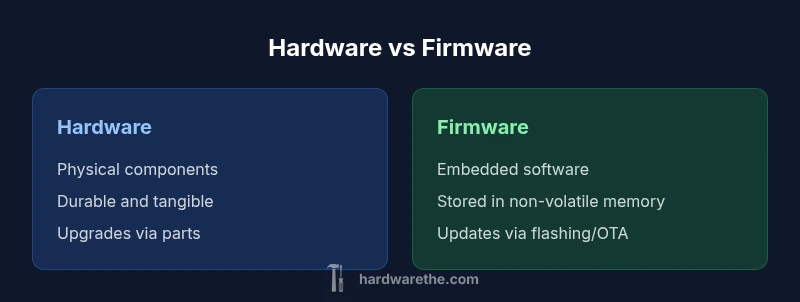
In practical terms, hardware and firmware are distinct but deeply linked: hardware is the physical substrate, while firmware is embedded software that runs on that substrate. Understanding this difference helps diagnose issues, plan upgrades, and perform safe device maintenance. For DIYers the rule of thumb is to treat hardware as touchable components and firmware as code stored in memory that controls those components.
Is hardware the same as firmware Clarifying core terms In everyday tech discussions many readers ask is hardware the same as firmware The short answer is no hardware refers to the physical components you can touch such as boards chips and connectors while firmware is embedded software programmed into non-volatile memory that runs on that hardware According to The Hardware a solid mental model is to separate tangible hardware from the code that controls it This distinction helps diagnose issues plan upgrades and communicate about devices accurately In real devices firmware sits at the intersection of hardware and software acting as a bridge that enables features security and functionality The phrase is hardware the same as firmware is a common misconception you can reframe it as hardware provides the substrate firmware provides the instructions stored on that substrate Understanding this separation reduces confusion when updating devices or analyzing failures.
How hardware and firmware interact Hardware provides the physical circuits connectors and power rails that enable a device to function Firmware stored in non-volatile memory such as flash contains the low level control and boot logic that initializes hardware manages peripherals and enforces security policies During power up firmware executes a series of instructions to bring the device to a ready state after which higher level software may take control Firmware updates can add features patch security flaws or fix bugs without replacing a single circuit board In contrast replacing hardware like a motherboard changes the capabilities by introducing new components and performance characteristics The hardware and firmware relationship is symbiotic without firmware hardware has limited usefulness without hardware firmware has nothing to control
The nature of hardware physicality and boundaries Hardware is tangible It wears out through mechanical wear heat corrosion and component aging Connectors can degrade PCBs can suffer solder fatigue and power regulators can drift This physical layer sets the boundary conditions for what a device can do and how long it can operate reliably When you upgrade a device you typically replace physical parts or boards which changes performance potential and compatibility Because hardware is subject to physical constraints manufacturers must design in tolerance for heat vibration and electrical noise DIYers often prioritize up front compatibility checks and proper cooling to protect hardware longevity
The nature of firmware embedded software and updates Firmware is software that resides in non volatile memory on the device often sitting between hardware and higher level apps It is responsible for boot sequences device initialization and peripheral control Firmware updates can be delivered over the air OTA or through direct flashing and they may alter features interface behavior or security controls Unlike typical application software firmware changes often require careful rollback options because a bad update can render a device unresponsive bricking Best practices include verifying updates from trusted sources maintaining a recovery plan and documenting firmware versions for each device
Where confusion often happens examples in consumer devices Consider a home router the hardware includes the CPU Ethernet ports and radio antennas while the firmware handles networking features firewall rules and WiFi management A printer contains physical rollers and sensors hardware plus firmware that interprets print jobs and manages cartridges A smartphone relies on a system on chip hardware together with multiple firmware layers that manage radios sensors and bootloaders In all cases firmware updates can improve performance or add features without changing the hardware but hardware upgrades typically require replacing a module or board This is why a practical rule is to separate concerns hardware is physical firmware is code that runs on that hardware
How to identify if something is hardware versus firmware A quick test is to inspect the part that physically exists versus the software running beneath it If you can remove reseat or replace the component you are dealing with hardware If you can only update through a software utility or OTA mechanism and the device remains the same chassis you are dealing with firmware Some devices separate the two with a maintenance interface consult the user manual for model specific guidance In documentation look for terms like non volatile memory bootloader microcontroller or embedded controller for firmware look for mentions of boards sockets connectors and heat sinks for hardware Keeping this taxonomy in mind helps diagnose failures and plan safe upgrades
Performance reliability and maintenance considerations Performance is a function of both hardware and firmware Firmware updates can unlock new features patch security flaws and optimize power management yet they can also destabilize devices if poorly tested Hardware reliability depends on build quality component choice and environmental conditions For DIY projects maintain a simple change log that records firmware versions and hardware revisions Regularly check for firmware updates from trusted sources and validate their compatibility with your hardware This dual focus keeping firmware current while preserving hardware integrity helps sustain device longevity and security
Practical decision guidelines for DIYers Start with a clear map identify the hardware components and the firmware running on them Prioritize updates by risk firmware updates addressing security or critical bugs should come first followed by feature updates Validate compatibility check connectors form factors and version requirements before replacing hardware or applying firmware Create a rollback plan know how to revert firmware if an update fails Document serials firmware versions and hardware revisions for future maintenance
Authority sources and further reading For authoritative guidance on hardware versus firmware consult standard technical references This article synthesizes common industry practices and DIY friendly explanations See the sources listed below for more depth and official specifications
Sources - https://www.nist.gov National Institute of Standards and Technology overview of embedded systems and hardware software boundaries - https://www.energy.gov U.S. Department of Energy materials on hardware reliability and maintenance in consumer electronics - https://www.microsoft.com/enterprise/blog Illustrative discussions on firmware updates and device lifecycle management
Comparison
| Feature | Hardware | Firmware |
|---|---|---|
| Nature | Physical components (chips boards connectors) | Embedded software in non volatile memory |
| Location/Scope | Tangible visible parts of a device | Code that runs on the hardware substrate |
| Update mechanism | Hardware replacement or component swaps | Software/firmware flashing or OTA updates |
| Lifecycle | Subject to wear aging physical failure | May be updated without hardware changes; bricking risk |
| Examples | Motherboard CPU RAM connectors | BIOS UEFI embedded controllers router firmware |
| Risk when failing | Physical failure repair or replacement | Firmware corruption can disable features recovery may be possible |
| Security considerations | Tamper resistance hardware level protections | Update supply chain secure boot patch management |
Upsides
- Clarifies responsibilities for maintenance and upgrades
- Guides DIYers in planning parts vs software updates
- Improves troubleshooting by using precise terminology
- Facilitates safer upgrade paths with proper rollback plans
- Supports better budgeting for long term device health
Negatives
- Can overwhelm beginners with terminology
- Firmware updates may fail and risk bricking devices if mishandled
- Hardware and firmware are tightly coupled; changing one can affect the other
Hardware and firmware are distinct yet interdependent treat them as separate layers for smarter maintenance and upgrades.
Understanding the boundary between physical components and embedded software helps DIYers plan safe upgrades diagnose issues and communicate with vendors. Both layers must be managed to keep devices secure and reliable.
FAQ
What is the difference between hardware and firmware?
Hardware refers to the physical components you can touch while firmware is embedded software that runs on those components. Firmware controls core functions and is stored in non-volatile memory. The two work together but are not the same entity.
Hardware is the physical parts; firmware is the software that runs on them. They work together but are different.
Can firmware updates replace hardware?
Firmware updates can add features and fix bugs without replacing parts but they can’t replace the physical substrate In some cases a faulty firmware can make a device unusable so safe update practices are essential.
Firmware updates can't replace hardware but they can change how it works.
Is firmware part of software or hardware?
Firmware is software but it's specialized software stored on non volatile memory inside hardware devices It sits between hardware controllers and higher level applications enabling core functions.
Firmware is a type of software that lives inside hardware.
How do firmware updates affect performance?
Firmware updates can improve performance security and energy efficiency they may also cause compatibility issues if the hardware limits aren’t met Always verify compatibility before updating.
Firmware updates can boost performance but may cause issues if not compatible.
Are there devices where hardware and firmware are often confused?
Yes routers printers and smartphones frequently require synchronized hardware and firmware Users may think updates apply to hardware but many changes are firmware based.
Routers and printers are common places where hardware and firmware get mixed up.
Where can I find firmware update instructions?
Firmware update instructions are typically in the device manual the manufacturer’s support site or trusted vendor portals Follow official guidance to avoid bricking the device.
Check the device manual or vendor site for official update steps.
Main Points
- Define terms clearly hardware is physical firmware is embedded software
- Plan upgrades by assessing both hardware and firmware impacts
- Keep firmware updated securely with rollback options
- Document versions and revisions for future maintenance
- Consider security implications on both layers