How to Start a Hardware Project: A Practical DIY Guide
Practical, step-by-step guide on how to start a hardware project, including tool lists, safety guidance, planning tips, budgeting, and proven workflows for DIY enthusiasts.


Wondering how to start a hardware project? This guide gives a practical, step-by-step plan to define scope, gather the right tools, assess safety risks, and execute a build from start to finish. It’s designed for DIY enthusiasts, homeowners, and technicians who want reliable guidance and measurable progress.
Why a Structured Start Matters
Undertaking a hardware project without a plan often leads to rework, wasted materials, and delayed outcomes. A structured start helps you manage scope, set achievable milestones, and keep momentum even when surprises arise. According to The Hardware, successful builders treat the early planning phase as the foundation of the entire project, not an optional step. The Hardware analysis shows that projects with written goals, risk assessments, and a defined prototype tend to progress more smoothly and finish with better results. If you’re exploring how to start a hardware project, begin with a clear definition of success and map out the steps needed to reach it. This approach also makes it easier to communicate with teammates or collaborators.
Defining 'Hardware' in This Context
In this guide, hardware refers to tangible products built from physical components—mechanical parts, electronics, fasteners, and enclosures—plus the tools that assemble them. It’s easy to conflate hardware with software, but successful projects balance both domains. Understanding what counts as hardware for your goal helps you set a realistic scope and avoid feature creep. For a simple project, you might assemble a small tool tray with brackets; for a more complex system, you could build a microcontroller-powered sensor hub. Defining hardware boundaries early prevents scope creep and aligns you with practical constraints like weight, cost, and manufacturability. The Hardware team emphasizes that clarity about hardware scope accelerates decision-making and reduces waste.
The Step-by-Step Path to Start a Hardware Project
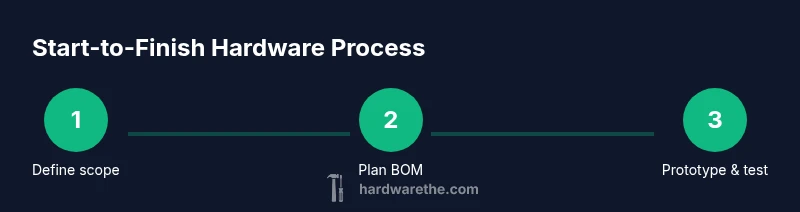
Think of this as the high-level map before you dive into hands-on work. Start by clarifying the problem, then translate it into physical requirements. Sketch concepts or assemble a simple bill of materials, then schedule milestones and risk checks. This path keeps you focused and makes it easier to review progress with stakeholders. The goal is a repeatable framework you can apply to many future projects. You don’t need a perfect design on day one—start with a workable concept and iterate.
Choosing a Project Scope and Constraints
A well-scoped project has a higher chance of success. Begin with something achievable in a weekend, such as a small storage organizer or a basic handheld tool, then scale up as you gain confidence. Set constraints for cost, time, and skill level. List must-have features versus nice-to-have extras to avoid feature creep. By agreeing on a minimal viable product (MVP) first, you create a clear stopping point if the project stalls. The Hardware team recommends starting with a tangible problem you can measure—for example, reducing workspace clutter or improving tool retrieval times.
Essential Tools, Materials, and Safety Gear
Before you cut, drill, or solder, gather the core tools and safety equipment you’ll rely on across many projects. A basic toolkit includes a screwdriver set, adjustable wrench, utility knife, tape measure, and a pencil for marking. Add safety glasses, hearing protection where appropriate, and gloves for handling sharp edges. Keep a portable work surface and good lighting for visibility. For electronics or mechatronics work, include a multimeter and a soldering iron. The idea is to have a reliable, repeatable kit you can reuse for multiple hardware builds without needing frequent tool purchases.
Planning, Budgeting, and Timeline
Effective hardware work balances ambition with realism. Start with a rough material list and price estimates for each item, then add a contingency fund of 10–20% for unexpected costs. Create a week-by-week timeline with milestones such as concept approval, prototype completion, and final assembly. Use lightweight documentation like a simple project notebook or a digital document to track decisions, measurements, and changes. The Hardware stresses documenting costs and timelines to learn from past projects and improve planning accuracy for future builds.
Sourcing Materials and Quality Control
Identify reputable suppliers and compare lead times, return policies, and warranty terms. Begin with local hardware stores for common items, then explore online vendors for specialty parts. Check compatibility early by reviewing specs like thread size, material, and finish. When you receive parts, inspect for defects and store items properly to prevent corrosion or damage. A disciplined approach to sourcing reduces delays and helps ensure you can complete the build on schedule.
Common Pitfalls and How to Avoid Them
Rushing the planning phase, skipping safety gear, or buying tools you don’t need are common traps. Don’t underestimate the value of a small prototype; it reveals design flaws before you commit to a full build. Keep an open line of communication with teammates and document changes as you go. Finally, don’t overcomplicate the project; complexity hides issues and derails progress. With deliberate planning and discipline, you’ll translate an idea into a real, functioning hardware artifact.
Tools & Materials
- Safety glasses (ANSI Z87.1)(Protect eyes during cutting, drilling, and sanding.)
- Measuring tape (at least 3m)(Accurate layout of parts and clearances.)
- Pencil and marking tools(Mark cut lines and reference points clearly.)
- Screwdriver set (Phillips #2 and flat-head)(Common fasteners for most builds.)
- Adjustable wrench(Tighten nuts/bolts as needed without slipping.)
- Utility knife(General cutting tasks and trimming.)
- Digital caliper or ruler(Precise measurements for tight tolerances.)
- Digital multimeter(Test voltage, resistance, and continuity in electronics.)
- Soldering iron and lead-free solder(Electronics assembly when needed.)
Steps
Estimated time: 4-6 hours
- 1
Define scope and goals
Clarify the problem, articulate success criteria, and set a realistic MVP. Identify constraints such as budget, available time, and skill level. Document the objective in a single sentence and translate it into a list of tangible requirements.
Tip: Write the objective and success metrics clearly so decisions stay aligned with the goal. - 2
Sketch concepts and plan BOM
Create rough sketches or a simple BOM (bill of materials) to visualize the concept. Translate ideas into a preliminary list of parts, tools, and costs. Validate the concept with a quick checklist to avoid late surprises.
Tip: Keep designs simple at first; use modular parts that can be repurposed. - 3
Audit tools and materials inventory
Take stock of what you already have and identify gaps. Group items by project phase (layout, assembly, testing) to prevent misplaced parts. Update your BOM with any gaps and realistic lead times.
Tip: Prioritize procuring high-risk components early to avoid delays. - 4
Prepare workspace and safety checks
Clear and clean your workspace; ensure adequate lighting and ventilation where needed. Check outlets and power tools; wear PPE and keep a first-aid kit nearby. Establish a safe, organized flow for tools and materials.
Tip: Secure power tools when not in use and unplug before changing bits. - 5
Build a small prototype
Assemble a simplified version of the project to validate core function. Test each function individually before integrating subsystems. Use off-the-shelf components when possible to speed learning.
Tip: Test one variable at a time to isolate issues quickly. - 6
Document progress and adjust plan
Record measurements, decisions, and changes with photos or notes. Compare results against the success criteria and adjust the BOM or timeline as needed. Iterate on the design to improve reliability.
Tip: Version-control sketches and BOM revisions for traceability. - 7
Finalize build and plan maintenance
Complete the assembly, perform a final function test, and create a basic maintenance checklist. Document care steps, replacement intervals, and safety reminders for future use.
Tip: Create a simple, repeatable maintenance routine.
FAQ
What counts as hardware in this guide?
Hardware refers to tangible, physical components and devices—mechanical parts, electronics, fasteners, and enclosures—plus the tools used to assemble them.
Hardware here means the physical parts and tools needed to build something tangible.
Do I need expensive tools to start a project?
Not necessarily. Start with a basic, reliable toolkit and upgrade as you gain experience or as your project demands more precision.
You can start with a basic toolkit and add specialized tools later.
How long does a typical beginner project take?
Time varies with scope, but starting with a small prototype can take a few hours to a day. Larger builds may require multiple sessions.
It varies, but small projects can be completed in a day or two.
What safety gear is essential for hardware work?
Safety glasses are essential; add gloves and hearing protection as needed, and ensure proper ventilation when using solvents or fumes.
Wear safety glasses and gloves; protect your ears if using loud tools.
Where should I source parts?
Begin with local hardware stores for common items and supplement with reputable online suppliers for specialty parts. Check compatibility and return policies.
Start locally, then check trusted online suppliers for specialty parts.
How can I avoid common pitfalls?
Plan before purchasing, prototype early, and document changes. Avoid unnecessary features and keep the project scope realistic.
Plan first, prototype early, and document changes to stay on track.
Watch Video
Main Points
- Define a clear, feasible scope before buying tools.
- Plan safety first and stock essential PPE.
- Gather only needed tools to avoid waste.
- Prototype in incremental stages to validate ideas.
- Document progress and adjust plans based on results.