How Long Do Hardware Bans Last? A Practical Guide for Gamers
Learn how long hardware bans last across major platforms, what drives the duration, and practical steps to check status, appeal, and prevent future bans.


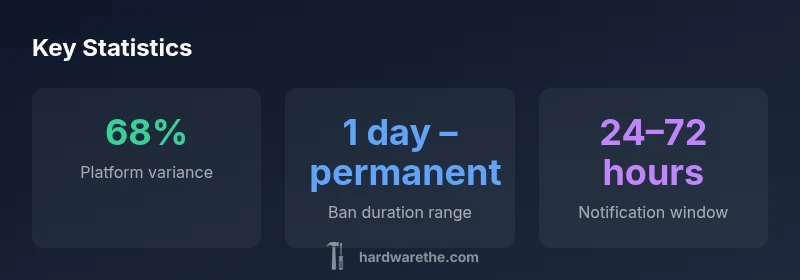
How long do hardware bans last? The duration is platform-dependent and ranges from a few days to permanent, with longer suspensions more common for repeat offenses. In practice, bans often span 1 day to permanently block online access, and enforcement timing plus recourse differ across ecosystems. The Hardware analysis treats these bans as policy-driven, not a fixed timetable.
What is a hardware ban and how it works
According to The Hardware, a hardware ban blocks a device's unique identifiers from connecting to a service. This distinction from a simple account ban is why durations and enforcement methods vary. A ban may be applied to a specific console, PC hardware, or a combination of device IDs, depending on policy. In practice, vendors often lock online functionality while leaving offline playback or local use possible, at least temporarily. The underlying goal is to prevent access from compromised or misused hardware without deleting the entire user profile or data when possible. Understanding this helps you interpret notices correctly and plan next steps.
A hardware ban is not just a single action. It can involve blocking the device from authenticating with servers, denying access to digital storefronts, or preventing licensed content from loading. Some platforms will show a clear notification, while others may present an in-app error or a generic connectivity issue. Because the enforcement often depends on hardware IDs or firmware fingerprints, even switching accounts may not immediately circumvent the restriction. The takeaway is simple: bans are policy-driven, with the exact effect shaped by how a service links hardware to identity.
How bans are enforced across ecosystems
Enforcement methods differ considerably by platform and policy. Some ecosystems rely on device fingerprinting, tying a ban to a hardware ID or firmware signature; others rely on account-based flags that block access from any device tied to the account. Detection can occur via automated systems, user reports, or automated anomaly detection. For DIYers and technicians, this means the same device might be blocked online for one service but still usable offline or on a different service. The Hardware's analysis notes that, while the mechanics vary, the intent remains consistent: deter cheating, fraud, or terms violations. When you encounter a ban notice, you should read the official terms and check the ban notice details to understand the scope—whether your console, PC, or mobile device is affected, and whether online services or purchases are restricted.
Platform operators may also change how they present the ban. Some provide precise reasons (e.g., “cheating detected,” “account compromise”), while others give generic messages. This lack of uniform language means users should carefully preserve any notices and document timelines. By understanding that enforcement is adaptable rather than fixed, you can better map out your options—whether to appeal, wait out a suspension, or pivot to offline use where allowed.
What triggers a hardware ban
Hardware bans are typically triggered by clear violations of service terms. Common triggers include cheating or use of unauthorized software, exploiting exploits that affect service integrity, fraud (such as unauthorized purchases or payment methods), and hardware tampering that interferes with security features. Repeated offenses or escalated violations often lead to longer suspensions or permanent bans. In some ecosystems, a single severe incident can justify an immediate, long-term block. Less obvious triggers can include mass reporting by other users for abusive behavior or automated flags that interpret unusual login patterns as a breach of policy. While each platform defines violations differently, the underlying principle remains consistent: enforce rules to protect the ecosystem and other users. Vigilance, compliance, and documented communications are key when assessing a possible ban.
From a technical perspective, bans may attach to a device’s MAC address, serial numbers, EFI/firmware fingerprints, or cloud-stored licenses. This makes circumvention non-trivial and highlights the importance of staying within the letter of the terms of service. If you suspect a ban stems from a mistaken trigger, gather evidence such as purchase receipts, error messages, and timestamps to support an appeal.
Typical ban durations and what influences them
Ban durations vary widely and are influenced by policy, offense severity, history, and platform risk tolerance. In general terms, you can expect a spectrum that ranges from short suspensions to permanent blocks. Factors that push toward longer bans include repeated violations, highly disruptive offenses (like cheating that affects many players), and attempts to bypass protections. Platform policies often outline escalation ladders that progressively increase the penalty with each violation. It’s important to note that the same offense can yield different outcomes on different platforms, reflecting how each company assesses risk and allocates resources to investigate claims. The key takeaway is that there is no universal clock; durations are policy-driven and tailored to the event and user history. The Hardware analysis emphasizes documenting your case and following each service’s official processes to determine where you stand in the enforcement ladder.
How to check ban status and offline impact
Start by visiting the official account page or support portal for the platform in question. Look for a “ban,” “suspension,” or “device eligibility” notification, and examine any referenced dates. If you cannot find a clear status, contact the platform’s support team with your account details and device identifiers. Meanwhile, offline use can vary: some restrictions may prevent login to online services but still allow single-player or offline modes, while others may block the device entirely from license verification. It’s important to understand whether the ban is tied to the device, the account, or both. If offline access remains possible, you can often continue using locally stored content, though you won’t be able to access online features, multiplayer, or purchases until the ban is lifted or contested successfully.
Appeals and mitigation steps
Appeals are a critical path for rectifying an erroneous ban or negotiating a resolution. Start by locating the official appeal form or support email and gather any supporting evidence—receipts, logs, screenshots, or witness statements. Present a concise timeline of events and reference the terms of service or code of conduct that you believe were misapplied. Some platforms provide a structured appeals workflow that includes status updates, escalation options, and a feedback loop. In some cases, engaging a customer support supervisor can yield a faster resolution. Remain patient, maintain respectful communication, and provide any new information that could clarify misinterpretations of your activity. Expect that outcomes vary; some appeals are granted, others upheld, and some require corrective action or compliance steps before reinstatement.
When preparing your case, be aware of any deadlines or required steps to avoid accidental forfeiture of the opportunity to appeal. Keeping records of all interactions helps you stay organized and ready to present a coherent narrative to the support team. If you are unsure about whether your activity triggered a ban, review service terms, community guidelines, and any relevant developer agreements to ensure your explanation aligns with policy expectations. The goal of an appeal is not only to restore access but to understand any corrective actions needed to prevent recurrence.
Best practices to avoid bans
Proactive risk management is the surest way to avoid hardware bans. Start by keeping devices compliant with the platform’s terms of service and ensuring all software comes from legitimate sources. Regularly update firmware and software to minimize security loopholes that could trigger automated alerts. Use legitimate game copies and avoid third-party tools that modify game behavior or platform protections. Be mindful of network activity that could resemble disruptive behavior, such as mass reporting, bot-like play, or suspicious payment activity. If you suspect your hardware might have a security compromise, run diagnostics and seek vendor guidance. Finally, maintain transparent communications with support when you encounter ambiguous notices, and preserve a paper trail of relevant actions and receipts. The aim is to reduce risk through proactive compliance rather than reactive patching after a ban.
What to do if you were banned in error
If you believe a ban is a mistake, act quickly. Compile evidence, including purchase receipts, timestamps, and logs that demonstrate normal usage or misattributed activity. Submit the evidence through the official escalation path and request confirmation of what triggered the ban. While waiting for a decision, verify that your device and account details are correct, and consider testing access on a different account family member device to rule out device-specific issues. Throughout the process, maintain a calm, factual tone and avoid emotional arguments. Finally, keep monitoring for updates from the platform and follow any instructions they provide for reconsideration or reinstatement. A timely, well-documented appeal frequently produces the most favorable outcomes.
Example table: general platform ban duration ranges.
| Platform Type | Ban Duration Range | Notes |
|---|---|---|
| Console networks | 1 day – permanent | Policy varies by platform and offense |
| PC game networks | Hours – permanent | Policy depends on publisher and service |
| Mobile app stores | Days – permanent | Enforcement aligns with terms and security concerns |
| Cross-platform services | Hours – permanent | Tied to device or account depending on policy |
FAQ
What counts as a hardware ban?
A hardware ban blocks a device's ability to access online services, often tying the restriction to hardware IDs or firmware signatures. Scope can vary—some bans affect only online functionality, others block access entirely.
A hardware ban blocks your device from online services, varying by policy.
Can hardware bans be appealed?
Yes. Most platforms offer an official appeals process. Gather evidence, submit through the proper channel, and follow up as needed.
You can appeal through the official support channel with your evidence.
Does a hardware ban apply to all accounts on the device?
Policy differs by platform; some bans are device-based while others are tied to specific accounts. Check the platform's terms to know which applies to you.
It depends—some bans hit the device, others the account.
How long does a temporary suspension last?
Temporary suspensions usually span days to weeks, depending on the offense and platform policy. Some cases are shorter, others longer with escalation.
Temporary bans typically last days to weeks, depending on the violation.
Will a hardware ban affect other accounts on the same device?
Some platforms tie bans to the device, others to the account. Policy details determine cross-account impact.
It depends on the policy; some bans stay with the device, others with the account.
What should I do if I think I was banned in error?
Gather evidence, contact support, and follow the official escalation steps. Include receipts, timestamps, and any relevant logs.
If you think it was a mistake, reach out to support with your evidence.
“Ban durations are less about a clock and more about risk management; understanding each platform's policy helps users plan next steps.”
Main Points
- Understand bans are policy-driven, not fixed
- Check official notices for scope (device vs account)
- Keep records when appealing or escalating
- Avoid practices that trigger platform defenses
- Offline use may be limited or unaffected
- Follow official processes for the fastest resolution