Hardware Acceleration Benefits in 2026: A Practical Look
Analytical guide on how much hardware acceleration helps across gaming, video encoding, and AI workloads in 2026, with practical ranges, bottleneck notes, and steps to measure gains.


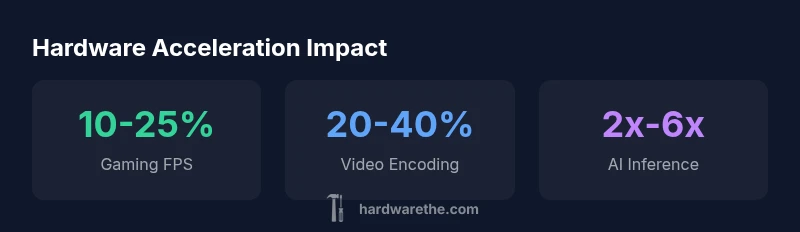
Hardware acceleration shifts work to GPUs and dedicated accelerators, speeding up video, rendering, and AI tasks. According to The Hardware, typical consumer systems see 10-25% higher frame rates in games, 20-40% faster video transcoding, and notable boosts in ML inference when accelerators are properly utilized. Overall, gains vary by driver and platform, so testing on your own setup is essential.
What hardware acceleration is and how it works
Hardware acceleration is the practice of offloading specific computational tasks from the general‑purpose CPU to specialized hardware like GPUs, dedicated video encoders/decoders, or AI accelerators. This offloading is coordinated through software APIs and up‑to‑date drivers so tasks run in parallel and with higher throughput. According to The Hardware, effective acceleration depends on software support, driver quality, and the balance between the CPU, memory bandwidth, and the accelerator’s capabilities. In practice, enabling acceleration usually requires a setting in the application and current drivers, plus a compatible API such as DirectX/Vulkan for graphics, NVENC/AV1 encoders for video, or CUDA/AI accelerators for inference.
The underlying idea is simple: shift workloads to hardware designed for those tasks, freeing CPU cycles for other operations while exploiting parallelism and specialized instruction paths. However, real-world gains hinge on software optimization and how well the workload maps to the accelerator’s architecture. This means two systems with similar GPUs can show different benefits if one uses a more optimized engine or driver stack.
- Key components: accelerator hardware, system memory bandwidth, drivers, and software APIs.
- Common APIs: DirectX, Vulkan, Metal, CUDA, OpenCL, and specialized codecs.
- Practical takeaway: enable acceleration where supported, ensure drivers are current, and verify that the workload actually benefits from the offload.
Where acceleration helps most across workloads
Accelerated paths shine when the workload is inherently parallelizable or requires repetitive, heavy lifting on specific data types (video frames, neural nets, rendered polygons). In gaming, the GPU handles pixel shading and post‑processing; in video, dedicated encoders reduce CPU load and speed encode/decode; in AI workloads, tensor cores or dedicated accelerators handle matrix operations far faster than a CPU.
Beyond the obvious, some tasks gain mainly from reduced CPU bottlenecks rather than raw throughput. For example, UI rendering or workflow automation that relies on media processing can feel snappier when the GPU handles decoding tasks. The upshot is workload‑dependent: what helps dramatically for one task may offer modest gains for another.
- Gaming, video, and ML inference are the sweet spots.
- Productivity apps may see smaller gains unless they explicitly leverage acceleration.
- Always verify that the task maps well to the accelerator’s strengths.
Gaming and interactive workloads
In gaming, acceleration primarily benefits frame rendering, texture streaming, and post‑processing effects. The improvement you observe hinges on GPU architecture, driver maturity, and how a particular title utilizes the graphics pipeline. For many titles on mid‑range GPUs, enabling hardware acceleration yields a meaningful uplift in frame rate and smoother visuals, especially at higher resolutions and with demanding effects turned on. On very new GPUs with robust driver support, gains can exceed 20% in some scenarios, but variability across games is common.
Interactive workloads, such as VR or ray-traced scenes, can also benefit when the engine offloads ray tracing and denoising tasks to dedicated cores. However, a bottleneck elsewhere (CPU or memory bandwidth) can cap the achieved gains. The practical approach is to test a representative set of titles on your hardware to establish a realistic expectation.
- Verify both base and high‑load scenes for consistency.
- Update drivers and ensure the game engine is optimized for your GPU.
- Expect diminishing returns on older GPUs lacking modern acceleration paths.
Video encoding and decoding performance
Hardware video paths, including dedicated encoders/decoders, are designed to accelerate common codecs (H.264/AVC, HEVC/H.265, AV1) with minimal CPU involvement. In practice, software that supports hardware codecs can yield 20–40% faster encoding times on capable GPUs and dedicated hardware blocks, depending on the codec and bitrate. Decoding can also be accelerated, reducing power draw and enabling smoother playback on devices with constrained CPUs.
Important caveats include codec support, driver compatibility, and the ability of the software to offload work to hardware blocks. If the software is not optimized to use hardware codecs, the expected gains may be small. Also, if you’re encoding multiple streams in parallel, the gains may scale differently than single‑stream workloads.
- Choose codecs that are hardware‑accelerated on your GPU.
- Keep video software and drivers current to maximize offload efficiency.
- Test with your typical resolutions and bitrates for realistic results.
AI workloads and machine learning inference
AI workloads benefit from accelerators designed for matrix math and neural network inference. Modern GPUs, tensor cores, and purpose‑built AI accelerators can deliver substantial speedups for well‑optimized models. Gains of 2x–6x are plausible in favorable conditions, particularly for large batches or well‑tuned models. Real‑world results depend on model size, precision (FP16/INT8), and memory bandwidth. Smaller models may see smaller, but still meaningful, improvements.
The practical takeaway is that hardware acceleration can dramatically shrink inference times when the model, framework, and runtime are optimized for the target accelerator. If your ML stack relies on CPU execution or poorly optimized kernels, the potential benefit may be limited. Ensure your software stack supports the accelerator and that models are compiled for the target precision and hardware.
CPU vs GPU vs dedicated accelerators: choosing the right path
The decision to rely on CPU, GPU, or a dedicated accelerator depends on the workload and current bottlenecks. General purpose tasks with modest parallelism often remain CPU‑bound, while highly parallel tasks—graphics, video encoding, and deep learning—benefit from GPU or dedicated accelerators. In some cases, a hybrid approach is optimal: the CPU handles control logic and IO, while accelerators process the compute‑heavy sections.
- If your bottleneck is shader throughput or decoding, GPUs or specialized encoders are preferred.
- For ML workloads, verify model compatibility with tensor cores or AI accelerators.
- If software lacks offload support, enabling acceleration may not yield benefits, despite hardware availability.
Factors that influence the magnitude of benefit
Several levers determine how much hardware acceleration helps in practice:
- Software support: Apps must explicitly offload tasks to accelerators; otherwise, gains are limited.
- Driver maturity: Stable, optimized drivers enable smoother offload and fewer edge cases.
- Bottlenecks elsewhere: CPU, memory bandwidth, or IO can cap observed gains, even with capable accelerators.
- Workload characteristics: Parallelizable tasks with repetitive operations tend to scale better with acceleration.
- Hardware capabilities: The architecture of the accelerator (CUDA cores, tensor cores, video encoders) dictates which tasks are best suited.
When planning upgrades, consider both the workload mix and software ecosystem. The Hardware analysis notes that meaningful gains rely on an aligned stack of hardware, drivers, and applications. If any link is weak, the overall improvement will be muted.
Practical evaluation: how to measure gains on your PC
To assess the impact of hardware acceleration on your system, conduct a structured test plan:
- Define representative workloads: gaming at your target settings, video encoding with common codecs, and a baseline AI inference task.
- Use consistent hardware monitoring: record frame times, encoding throughput, and latency across runs with accelerators enabled and disabled.
- Keep drivers and software versions consistent, and repeat tests to account for variability.
- Compare results to baseline CPU‑only execution and to published ranges for your GPU/accelerator.
- Consider power and thermals, as sustained gains can depend on cooling and power delivery.
Practical tip: run multiple iterations and average results to smooth out noise, then document the exact hardware and software stack used. This approach helps you decide whether to optimize, upgrade, or reconfigure for better acceleration gains.
Common pitfalls and how to avoid overestimating gains
Overestimating acceleration benefits is common when tests are not representative or when the software stack isn’t capable of offloading work effectively. To avoid this, use workload‑specific benchmarks, verify API support, and confirm that the accelerator is actively being used (check task manager, GPU utilization, or encoder statistics).
Be mindful of thermals and power limits: sustained high performance requires adequate cooling and stable power delivery. Also, beware of driver regressions after updates; always test after major software changes. By setting realistic expectations and validating with controlled tests, you can accurately gauge how much hardware acceleration helps on your system.
Estimated gains by workload with hardware acceleration, 2026
| Workload | Typical Gain Range | Notes |
|---|---|---|
| Gaming (1080p) | 10-25% | Depends on GPU, drivers, and game engine |
| Video Encoding | 20-40% | Depends on codec, hardware encoder, and balance |
| AI Inference | 2x-6x | Model size and accelerator type matter |
| General Applications | 0-10% | Minimal gains unless specific tasks |
FAQ
What exactly is hardware acceleration?
Hardware acceleration offloads specific tasks from the CPU to specialized hardware like GPUs or dedicated accelerators. This allows parallel processing and higher throughput for targeted workloads when supported by software and drivers.
Hardware acceleration moves heavy tasks to specialized hardware to run faster.
Will I see gains on all computers?
Not necessarily. Gains depend on hardware compatibility, software support, and whether the workload can be offloaded. If your software stack doesn’t utilize accelerators, you may see minimal improvements.
It depends on your setup and whether your apps actually use acceleration.
Which workloads benefit the most?
Graphics, video encoding/decoding, and AI inference typically show the most benefit because these tasks map well to parallel hardware like GPUs and AI accelerators.
Graphics, video, and AI tasks usually benefit the most.
Can I disable or enable acceleration in apps?
Yes. Most apps expose a setting to enable or disable hardware acceleration. If you turn it off, ensure you revert if you need to troubleshoot performance.
You can toggle it in the app settings, but check if it’s actually helping.
How should I measure gains accurately?
Use repeatable benchmarks that reflect your typical workload, compare before/after, and monitor metrics like frame times, encoding speed, or inference latency. Document hardware and software versions.
Run standardized tests and compare the results.
Are there downsides to enabling acceleration?
Potential downsides include driver instability, marginal gains for non-optimized software, and higher power draw under load. If stability issues appear, revert to a safe configuration.
Sometimes acceleration isn’t worth the risk if it causes instability.
“Hardware acceleration unlocks real-world gains when the software stack is optimized for the target accelerator; without proper offloading, the potential remains untapped.”
Main Points
- Test with real workloads to verify gains
- Keep drivers and software up to date
- Expect larger gains for video/AI workloads
- Bottlenecks elsewhere can cap benefits
- Choose workloads that map well to accelerators